


A Microsoft 365 governance mode is the operating model an organisation chooses for governing its Teams and SharePoint workspaces, defined by two independent decisions: the governance approach (preventive or reactive) and the security posture (scoped or tenant-wide tool access). Those two decisions produce four modes — Enclave, Enforced, Scoped and Native — and the mode you need decides which governance tools are even an option for you.
Most conversations about Microsoft 365 governance move straight to features — templates, lifecycle rules, guest expiration, audit trails. Before any of that, however, an IT department needs to make those two decisions, because they determine which tools are even in scope. And the same governance solution can be deployed differently for each combination.
The two dimensions behind every governance mode: approach and security
The two decisions are independent, and together they define the mode. The first sets how you govern; the second sets how much access the tool needs to do it.
The first is a governance approach decision: do we prevent problems at the moment a workspace is created, or do we let Microsoft's defaults run and clean up afterwards? A preventive approach configures each Team or SharePoint site collection correctly at creation — the right structure, the right permissions, the right lifecycle rules — so the problems never appear, and structures stay standardised and hard to drift out of policy. A reactive approach cannot steer how workspaces are created, so sprawl builds up and then has to be identified, sorted and cleaned up after the fact — which makes standardised channel and file structures almost impossible to guarantee.
The second is a security decision: how much access are we willing to grant a third-party tool inside our tenant? This is one of the sharpest pain points for IT departments: many governance tools demand high, tenant-wide Microsoft Graph permissions such as `Sites.FullControl.All` or `Group.ReadWrite.All` — several of which are critical from a privacy and security standpoint. Organisations that must satisfy frameworks like ISO 27001 or TISAX often will not — or cannot — grant rights that broad to a governance tool, and move towards scoped access, where the tool may only manage the workspaces it is explicitly allowed to. Others are comfortable granting tenant-wide rights.
Neither answer predicts the other. Prevention is possible with either broad or scoped tool access — you can enforce structure at creation time whether the tool holds tenant-wide permissions or minimal ones. And scoped access is possible with either preventive or reactive governance — how many rights the tool holds does not dictate how the organisation wants to run its workspaces.
Two independent decisions — approach (preventive / reactive) and security (scoped / tenant-wide) — give four possible combinations. A real 2×2, not a single spectrum. We name each combination as a governance mode, so an IT department can point at the one that matches its own approach and security requirements: the Enclave, Enforced, Scoped and Native modes.
In Valprovia Governance, each mode is produced by two configuration dials — so it helps to know them before the modes: Pooling is the deployment dial (the security axis). With Pooling on, IT pre-creates a pool of workspaces the tool may manage, so it runs scoped, without tenant-wide rights; with Pooling off, the tool holds tenant-wide permissions. Standard Owners is the ownership dial (the approach axis). With Standard Owners off, the governance layer is the technical owner and rules are enforced at creation (preventive); with Standard Owners on, designated owners work natively in Teams and drift is reconciled afterwards (reactive). Each mode below is just one combination of these two dials, covered in full further down.
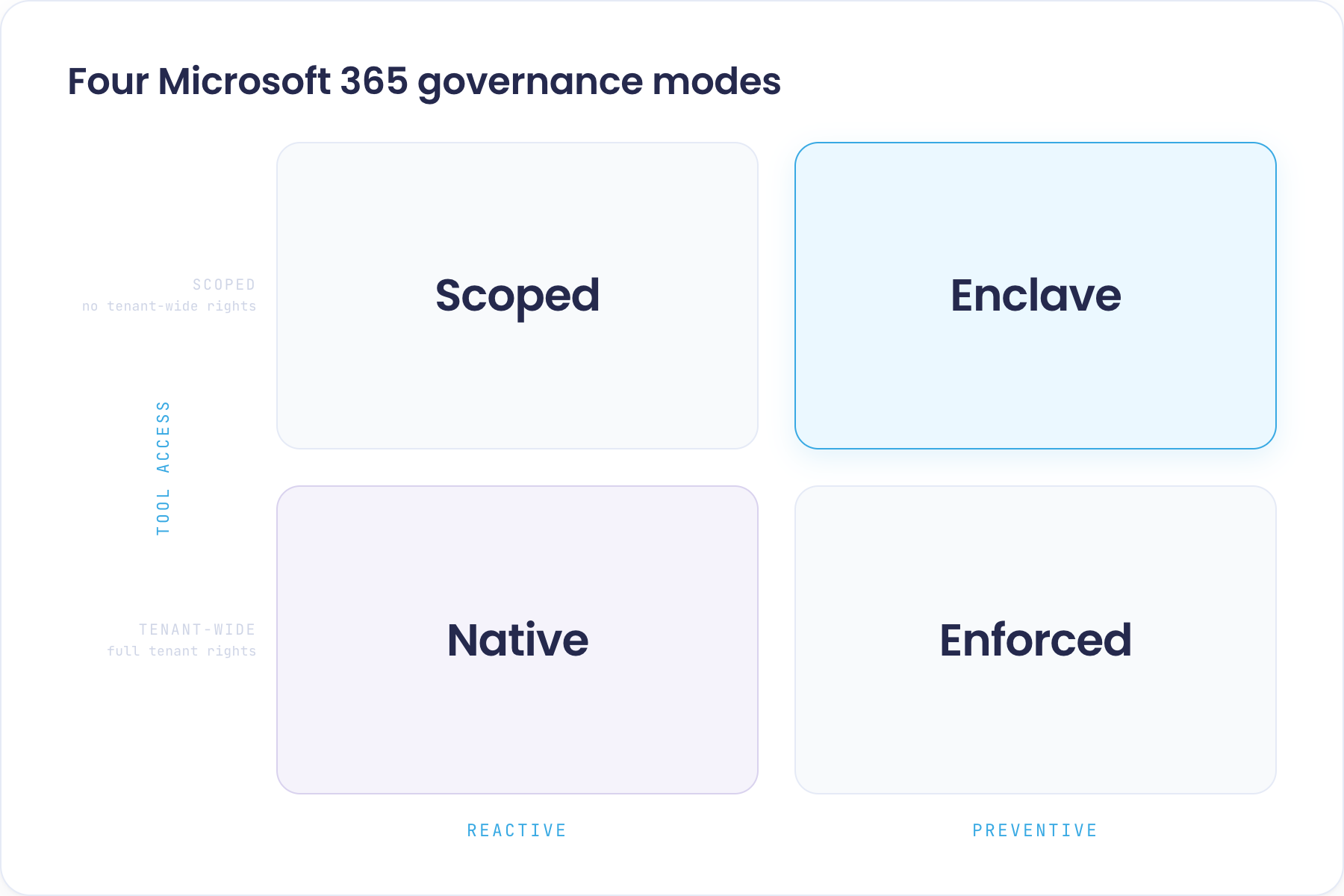
The four Microsoft 365 governance modes, explained
Each mode is a named point on the 2×2: a governance approach paired with a security posture. Here is what each one is, how Valprovia Governance delivers it, the situation it fits, and the kind of organisation that runs in it.
Enclave mode (preventive + scoped)
Enclave mode is preventive governance delivered without tenant-wide rights — structure is enforced at creation time, while the tool only ever touches a bounded set of workspaces. It is the most demanding of the four modes, and the one most established M365 governance tools cannot serve, because they need tenant-wide permissions to enforce anything. Valprovia delivers it with a Pooling deployment and Standard Owners disabled. Pooling is the deployment option that lets the solution run without tenant-wide application permissions: instead of the tool creating Microsoft 365 groups at runtime (which would require tenant-wide rights), IT pre-creates a pool of empty workspaces the tool may claim and manage. Valprovia then operates as a scoped service user that can touch nothing outside that pool, and no end user is promoted into a SharePoint Site Collection Administrator role.
The classic situation is a subsidiary or country entity inside a larger group that wants to roll out structured Teams for its project work, but whose group security team will not hand tenant-wide admin rights to a subsidiary — so both requirements apply at once: prevention and minimal permissions. It is the sharpest fit for regulated subsidiaries and country entities inside larger corporate groups — across financial services, public sector, manufacturing, pharma and automotive — that must satisfy frameworks like ISO 27001 or TISAX, cannot obtain tenant-wide M365 rights, and still want standardised channel and file structures.
A quick way to check whether the Enclave mode is your fit: five questions, each pointing to either a preventive approach or scoped access. The more of them you answer yes to, the more clearly Enclave is the mode you need.
Does the Enclave mode fit your organisation?
Five questions that point to the Enclave mode — the more that apply, the sharper the fit.
- 1 Do you need standardised Teams and SharePoint structures? Preventive
- 2 Do compliance frameworks like ISO 27001 or TISAX apply to you? Scoped
- 3 Is this for one business unit inside a group, not the whole company? Scoped
- 4 Are you a large organisation with many workspaces and users? Preventive
- 5 Should problems be prevented at creation, not cleaned up afterwards? Preventive
Enforced mode (preventive + tenant-wide)
Enforced mode is preventive governance with the strongest enforcement guarantee — every workspace action passes through the governance layer at the moment it happens, so a rule cannot be broken even briefly. Valprovia delivers it with a Standard deployment and Standard Owners disabled: the service account is the single technical owner and the only Site Collection Administrator, so rules are enforced from one controlled point rather than reconciled after the fact. It fits central IT teams that own the whole tenant, are willing to grant tenant-wide rights, and create Teams and SharePoint sites at scale — typically larger organisations with a hard standardisation or audit mandate that need every workspace to be in policy at creation, not caught and reverted afterwards.
Scoped mode (reactive + scoped)
Scoped mode keeps the governance tool's footprint minimal while owners work natively — prevention is not the driver; a small attack surface plus strong reporting and remediation is. Valprovia delivers it with a Pooling deployment and Standard Owners enabled: no tenant-wide permissions are needed, and the designated owners work in the native Teams client while Valprovia Governance reconciles drift on its sync cycle. It fits security-conscious organisations that will not grant broad rights to a third-party tool but have no hard need to standardise structures up front — the scoped footprint is a security choice, independent of governance maturity.
Native mode (reactive + tenant-wide)
Native mode is the Microsoft out-of-the-box position — broad access, native tooling, problems caught and cleaned up after they occur. Valprovia delivers it with a Standard deployment and Standard Owners enabled: owners work fully in the native Teams client while Valprovia Governance keeps the governance layer in sync. It fits agile organisations without heavy security constraints that accept reactive clean-up over upfront enforcement — and many organisations sit here simply because it is the default.
Governance without tenant-wide rights: the common thread
The two scoped modes — Enclave and Scoped — depend on the same underlying capability: a governance tool that can operate without tenant-wide Microsoft Graph permissions. That is what turns Microsoft 365 governance that does not demand tenant-wide rights from a slogan into an actual product promise. Valprovia Microsoft 365 governance is designed so that a single product serves every one of these modes, because each mode is simply a named combination of two configuration dials: the deployment mode (Standard or Pooling) and the Standard Owners switch.
The two dials behind every mode
Pooling: how Valprovia Governance deploys without tenant-wide application permissions
Pooling is Valprovia Governance's built-in deployment option for environments where tenant-wide application permissions are not available, or not desired. Instead of the solution creating Microsoft 365 groups at runtime (which would require the tenant-wide `Group.ReadWrite.All` permission), the customer's IT team pre-creates a set of empty Teams groups. Those groups sit in a pool, ready to be claimed. When a user requests a workspace, Valprovia takes a group from the pool, configures it to match the requested template and security level, and hands it over.
Valprovia Governance authenticates as a dedicated service user — a regular user account, not an administrator, protected by MFA and Conditional Access policies. It can only manage the workspaces in its own pool; it has no access to any other groups, teams or SharePoint sites in the tenant. Anything that would need tenant-wide permissions is handled up front by the IT department, which runs the producer script under its own credentials to pre-create the pool groups and bake in the SharePoint sharing settings each Security Level requires. Ongoing lifecycle actions — archive, restore, delete a workspace — continue to work through Microsoft Graph paths the service user is authorised to invoke.
Standard Owners: two ways to record who owns a Team in Microsoft 365
Ownership of a governed Team can be recorded in Microsoft 365 in two different ways. Valprovia Governance exposes this as a single environment-wide switch.
With Standard Owners disabled, the Valprovia Governance service account is the technical Microsoft Teams owner of every governed Team, and the only Site Collection Administrator on the SharePoint side. The workspace owners that the customer designates are recorded as members in Microsoft's model, while holding full owner-level rights inside Valprovia Governance's own record. This is the right fit when governance rules should be enforced from a single controlled point — typical of a preventive posture.
Valprovia calls the architecture this produces the Virtual Security Layer. SharePoint's native permission model expects the person with full control over a site to hold the SharePoint Site Collection Administrator role — a role that carries broad, site-wide privileges, and which every Microsoft Teams owner otherwise inherits by default. With Standard Owners disabled, no end user is ever promoted into that role: owner rights are enforced in Valprovia Governance's own record, and governance rules cannot be bypassed by editing a SharePoint site directly.
With Standard Owners enabled, the workspace owners that the customer designates become the technical Microsoft Teams owners of their Teams. They can configure channel moderation, archive or restore their Team, and receive Microsoft's native join-request notifications directly in the Teams client. This is the right fit when the customer wants owners working natively in Microsoft Teams, with Valprovia Governance keeping the governance layer in sync — typical of a more reactive posture. See Standard Owners for the full walk-through.
Which Valprovia Governance mode fits each situation
| Mode | Typical customer | Valprovia configuration |
|---|---|---|
| Enclave (preventive + scoped) | Group subsidiary rolling out project Teams; parent will not grant tenant-wide rights | Pooling deployment + Standard Owners disabled — no tenant-wide app permissions needed, and no user is promoted into SharePoint admin roles |
| Enforced (preventive + tenant-wide) | Central IT with full permissions that wants every rule enforced at request time, not reconciled after | Standard deployment + Standard Owners disabled — every workspace action goes through Valprovia Governance at request time, so a governance rule cannot be broken even briefly |
| Scoped (reactive + scoped) | Security-conscious organisation that will not grant broad rights to a third-party tool | Pooling deployment + Standard Owners enabled — no tenant-wide app permissions needed; owners work natively in the Teams client while Valprovia Governance reconciles drift on its sync cycle |
| Native (reactive + tenant-wide) | Organisation comfortable granting tenant-wide permissions that wants owners working natively in Microsoft Teams | Standard deployment + Standard Owners enabled — owners work natively in the Teams client while Valprovia Governance reconciles drift on its sync cycle |
Not sure which row is you? Two questions settle it — how much access you can grant, and whether you want prevention or clean-up.
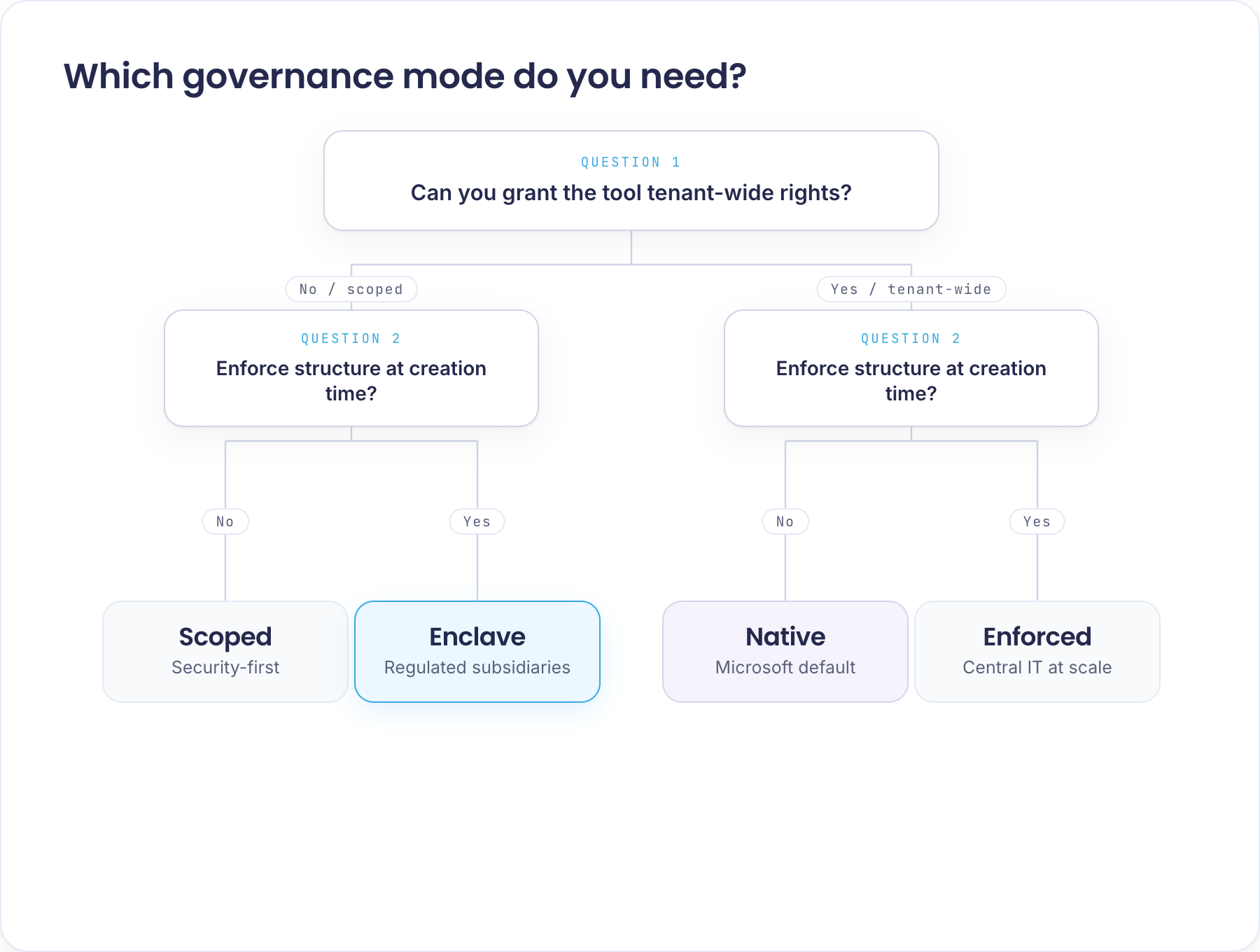
Microsoft 365 governance for a subsidiary in a shared tenant
Here is the uncomfortable part most vendors skip: a subsidiary inside a large corporate group frequently cannot deploy a Microsoft 365 or Teams governance tool at all — not because of budget or features, but because the tool would demand tenant-wide rights over the entire group's tenant just to govern the subsidiary's own workspaces. No group security team grants that, so the project dies before it starts. The Enclave and Scoped modes exist precisely to break that deadlock.
Picture a business unit of 500 people inside a corporate group of 50,000 employees, all in one shared Microsoft 365 tenant. That business unit wants to roll out a Microsoft Teams governance solution for its own project work — its own templates, approval workflows and lifecycle rules, applied only to its own workspaces. It runs into a wall that has nothing to do with the governance features and everything to do with permissions.
A conventional governance tool needs tenant-wide rights such as `Sites.FullControl.All` or `Group.ReadWrite.All` to operate. But those permissions are tenant-wide by definition: to let the tool manage the 500-person unit's workspaces, the group's Global IT would have to grant it full control over every SharePoint site and every group across all 50,000 employees. No security team will hand a subsidiary's tooling that much reach over the whole group — and under compliance frameworks like ISO 27001 or TISAX they often cannot. So the rollout stalls before it starts. This is one of the single biggest reasons a business unit inside a larger group cannot adopt an M365 or Teams governance solution at all.
The Enclave mode (and its reactive sibling, the Scoped mode) is what makes it possible. With the Pooling deployment mode, Global IT pre-creates the pool of Teams groups that the business unit is authorised to consume, retains ownership of every one of them, and defines the SharePoint-level settings that apply. Valprovia Governance then operates as a scoped service user that can only touch the workspaces in that pool — never any of the other 49,500 employees' sites, teams or groups. The business unit gets a fully preventive Microsoft Teams governance experience — templates, approval workflows, lifecycle rules, security levels — inside a scope that Global IT has bounded up front. Global IT sees no expansion of tenant-wide permissions. The business unit keeps the governance features it wanted.
This deployment pattern is not available in Microsoft 365 governance tools that require tenant-wide permissions to operate.
Why granting tenant-wide rights is the real risk — and why the mode doesn't change that with Valprovia
It is worth being clear about what the scoped side of the matrix is actually protecting against. Handing a governance tool tenant-wide permissions like `Sites.FullControl.All` is not a paperwork detail — for most organisations it is the riskier decision, because those permissions are the master key to the entire Microsoft 365 estate. When that tool is an external, multi-tenant SaaS product, granting it those rights means handing your organisation's master key to a third party operating outside your environment. The scoped modes exist so you never have to.
Valprovia Governance changes the calculation on both counts. It is not an external SaaS: it runs self-hosted in your own Microsoft 365 tenant as a single-tenant instance, so your data never leaves your environment and no third-party cloud is introduced. And that holds in every mode. The two scoped modes (Enclave and Scoped) additionally reduce what the tool may touch to a bounded pool of workspaces; the two tenant-wide modes (Enforced and Native) grant broader reach — but even then, the reach stays inside your own tenant, under your own control, not in someone else's cloud. Whichever mode you run, you are not giving an outside party the key to your house.
Key takeaways
- The 2×2 is a useful frame for Microsoft 365 governance conversations because the two decisions — approach and security — really are independent; treating them as one is how governance projects stall.
- The four modes — Enclave, Enforced, Scoped and Native — name each combination, so an IT department can point at the one that matches its own governance approach and security requirements.
- A tool that covers all four modes means the deployment approach is not constrained by whichever ones the shortlist of vendors happens to serve — and the same product can move between modes as your organisation's posture changes.
Frequently asked questions about Microsoft 365 governance modes
What are the four Microsoft 365 governance modes?
The four modes are Enclave (preventive + scoped), Enforced (preventive + tenant-wide), Scoped (reactive + scoped) and Native (reactive + tenant-wide). Each is a combination of two independent decisions: the governance approach (prevent problems at creation, or clean them up afterwards) and the security posture (grant the tool scoped or tenant-wide access). Naming each combination lets an organisation point at the one that matches its own approach and security requirements.
Which governance mode lets you avoid tenant-wide (Sites.FullControl.All) permissions?
A scoped governance mode. Instead of granting the tool tenant-wide permissions like Sites.FullControl.All or Group.ReadWrite.All, Valprovia Governance uses its Pooling deployment: IT pre-creates a pool of workspaces the tool may manage, and Valprovia operates as a regular service user that can only touch that pool — nothing else in the tenant. That is the Enclave mode (with prevention) or the Scoped mode (reactive), and it is why governance can run in a shared tenant without expanding tenant-wide rights.
What is the difference between the Enclave and Scoped modes?
Both are scoped — neither needs tenant-wide rights. The difference is the governance approach. Enclave is preventive: structure is enforced at creation time (Standard Owners disabled), which fits organisations that need standardised, unchangeable structures. Scoped is reactive: owners work natively in the Teams client and Valprovia Governance reconciles drift on a sync cycle (Standard Owners enabled), which fits security-conscious organisations that do not need upfront standardisation.
Can a subsidiary run its own Teams governance inside a group's shared M365 tenant?
Yes — but only with a governance tool that works without tenant-wide rights. A conventional tool needs tenant-wide permissions such as Sites.FullControl.All over the whole tenant, which no group security team will grant to a subsidiary, so the rollout stalls. Valprovia's Enclave and Scoped modes let the subsidiary govern only its own bounded pool of workspaces, with no tenant-wide permissions, so the group's security posture is unaffected.
Which governance tools work without tenant-wide Microsoft Graph permissions?
Most established M365 governance tools require tenant-wide permissions (for example Sites.FullControl.All or Group.ReadWrite.All) to operate. Valprovia Governance is designed to run scoped: in its Pooling deployment it authenticates as a regular service user that can only manage a pre-created pool of workspaces and has no access to anything else in the tenant.
Which governance mode fits an ISO 27001 or TISAX-regulated organisation?
Organisations under ISO 27001 or TISAX constraints usually cannot grant tenant-wide rights to a third-party tool, which points them to a scoped mode. If they also need standardised structures enforced at creation time, that is the Enclave mode (preventive + scoped); if prevention is not a hard requirement, the Scoped mode (reactive + scoped) keeps the footprint minimal while owners work natively.
Is Valprovia Governance a SaaS product or self-hosted?
Valprovia Governance runs self-hosted as a single-tenant instance inside your own Microsoft 365 tenant — it is not an external multi-tenant SaaS, so your data never leaves your environment. That holds in every mode; the scoped modes additionally limit what the tool may touch to a bounded pool of workspaces.


