


Enterprises that run Microsoft Teams at scale face a well-known tension between control and native user experience. The more control a governance layer imposes, the more it tends to sit between users and the Microsoft Teams experience they are accustomed to.
Standard Owners is a new capability in Valprovia Governance that extends real Microsoft Teams ownership to the workspace owners your organisation designates - opening up the full range of native Microsoft Teams features to them while keeping every governance policy in place.
The traditional ownership model
To provide consistent, provable enforcement of governance policies, Valprovia Governance has historically registered its own service account as the technical Microsoft Teams owner of every managed team. This design has served customers well: minimum and maximum member counts, guest invitation rules, lifecycle policies, and every other template rule are enforced uniformly at the point of every action, because Valprovia Governance is always in the position to enforce them.
The people your admins name as workspace owners hold full owner-level permissions inside Valprovia Governance - adding and removing members, editing metadata, requesting lifecycle changes, and managing everything the platform exposes. In Microsoft's own model, they are recorded as team members with owner-level privileges, while the service account holds the technical Microsoft Teams owner role.
Under this arrangement, workspace owners work with their teams through Valprovia's Microsoft Teams governance platform, which coordinates with Microsoft Teams on their behalf and applies governance policies consistently at every step.
Introducing Standard Owners
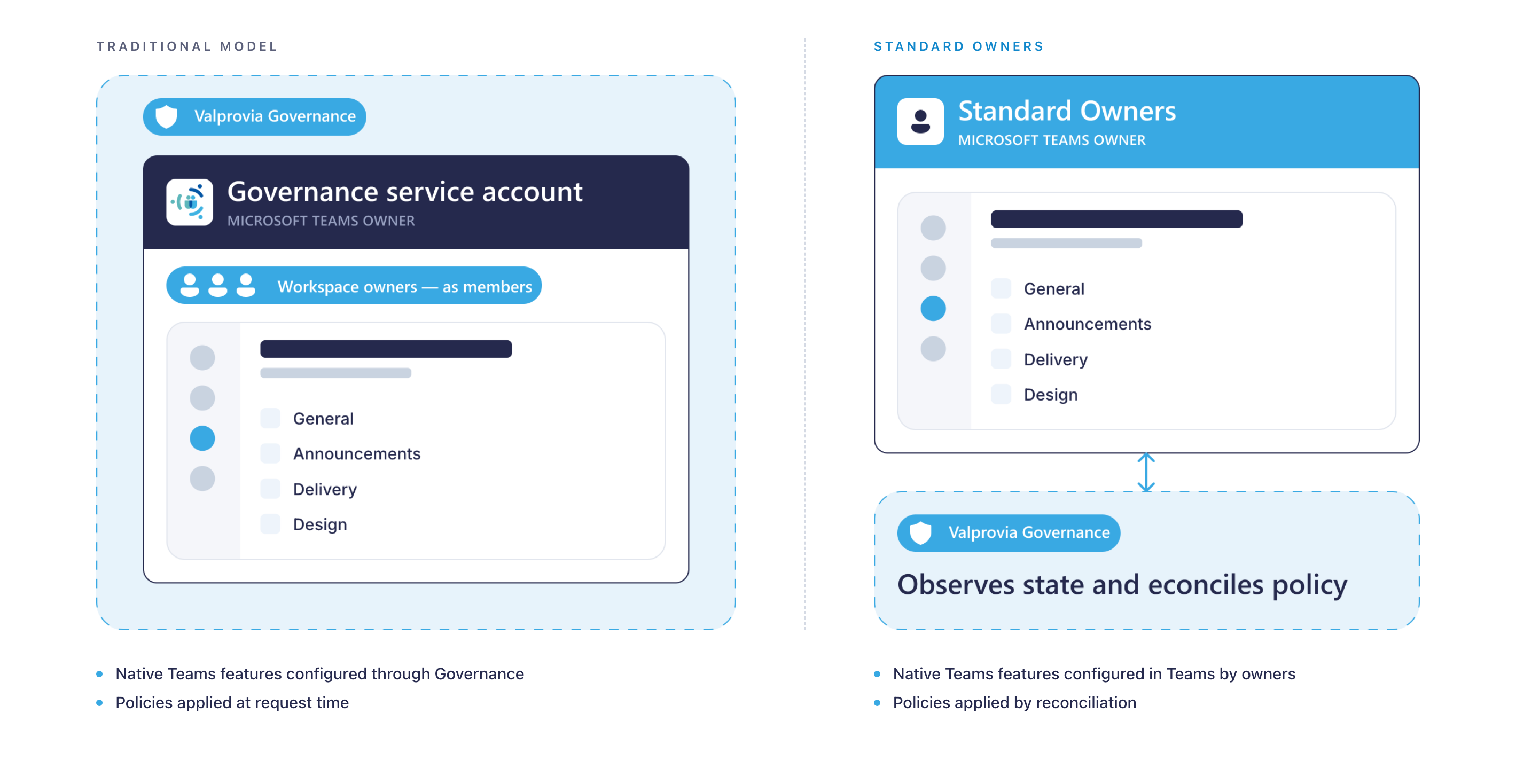
Standard Owners is a new capability we are introducing in Valprovia Governance. When it is enabled, the people you designate as workspace owners become the real Microsoft Teams owners of their teams - the same as if they had created the team themselves in Microsoft Teams. The service account that used to hold that role technically steps aside. Real users own the team; Valprovia Governance now works alongside them, rather than on their behalf.
The result is a model in which your real workspace owners you designate hold real Microsoft Teams ownership on their teams, while Valprovia Governance continues to enforce the policies that make your Microsoft 365 environment governable.
What workspace owners do under Standard Owners
With Standard Owners on, the native Microsoft Teams capabilities become available to your workspace owners directly:
- Channel moderation is fully available in the Teams client. Workspace owners can enable moderation, designate moderators, and control posting and replies.
- Archive, delete, and restore from the Teams client are available to workspace owners, alongside Valprovia Governance's own lifecycle interface. When a workspace owner performs one of these actions in the Teams client, Valprovia Governance detects the change through its sync process and updates the workspace's lifecycle status in Valprovia Governance to match - the workspace appears as archived, restored, or deleted there without a separate action needed.
- Microsoft's native join-request handling reaches real workspace owners directly - join-request emails arrive in their inbox, and approval prompts appear in their Teams client - so external join requests can be reviewed and actioned inside Teams.
- Team tag management happens in the Teams client. Workspace owners decide whether tags are managed by owners only or by owners together with members.
- Team-level settings that Microsoft exposes to real Team owners are visible and configurable, exactly as in an ungoverned Team.
For end users, a governed workspace under Standard Owners feels the same as a native Microsoft Teams team - because that is what it now is.
How Valprovia Governance continues to enforce your policies
Extending real ownership to workspace owners does not change the reach of your governance policies. Every rule in your templates - minimum and maximum members, guest and lifecycle policies - continues to apply.
What evolves is the enforcement point. Valprovia Governance now detects governance-affecting changes shortly after they occur in the Microsoft Teams client and reconciles the state through Microsoft Graph. If a workspace owner adds a member beyond the maximum, Valprovia Governance's sync process brings the team back into line with the template.
This model preserves the enforceability of every policy in your templates and gives workspace owners a native Microsoft Teams experience at the same time.
What changes in your templates
With Standard Owners on, several template controls changed:
Lifecycle actions on the workspace - archive, delete, and restore - become directly available to workspace owners. The template checkboxes that previously controlled whether owners could initiate these actions are consolidated, since real Microsoft Teams owners can perform them themselves.
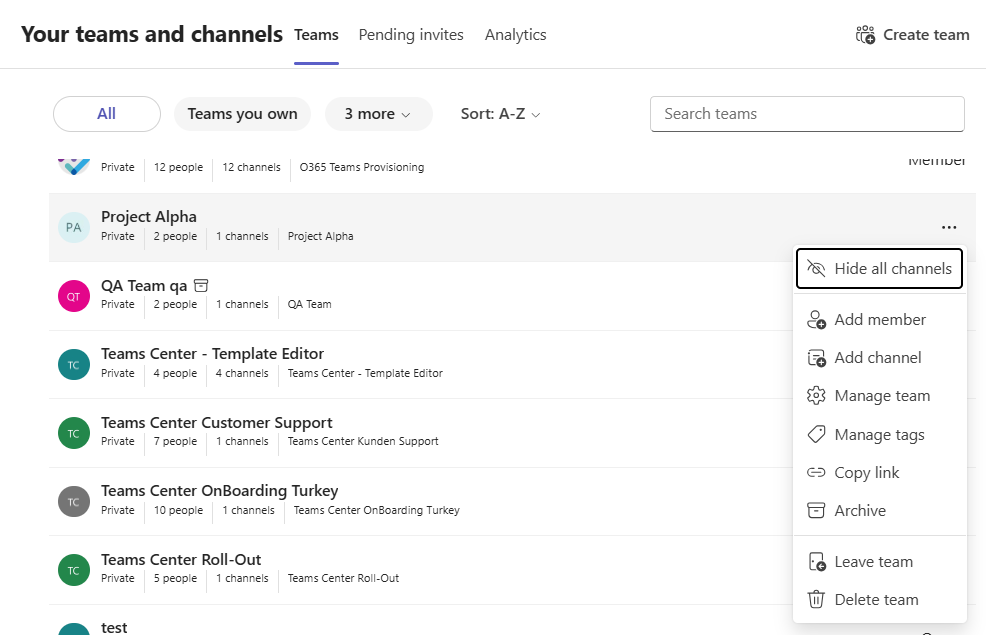
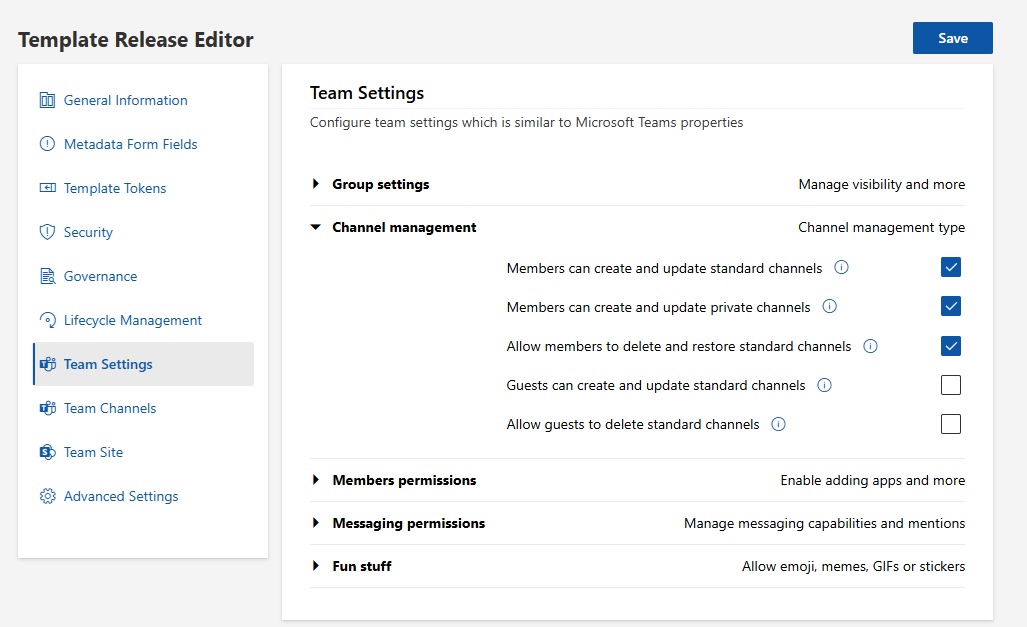
Channel management now happens in the Microsoft Teams client. Because workspace owners are the real Microsoft Teams owners, they create, update, and organise channels there directly. The channel settings that remain in the template are the ones a real Team owner configures natively in Teams - permissions for members and guests.
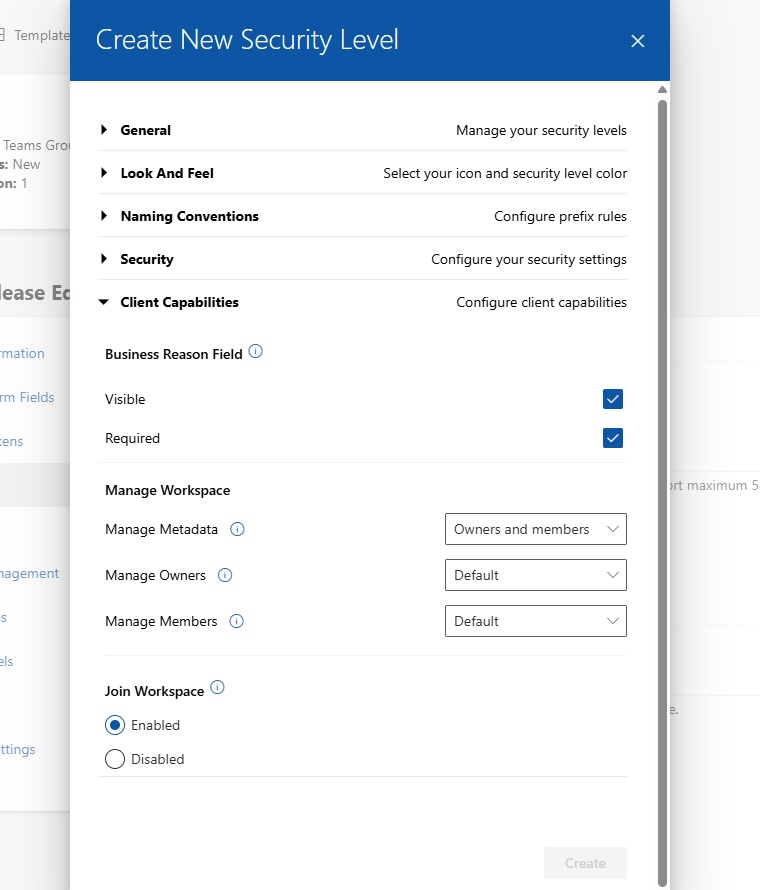
Client capability settings and NDA acceptance modes are streamlined. At the security-level configuration, options such as Manage Logo and Leave Workspace are consolidated, because these are handled by workspace owners and members directly in the Microsoft Teams client. On Team templates, the Forced option for NDA acceptance is consolidated for the same reason.
A three-value sharing setting - owners and members, owners and limited members, or owners only - is available on Team templates and refines the existing sharing setting on Site templates, giving admins finer control over content sharing.
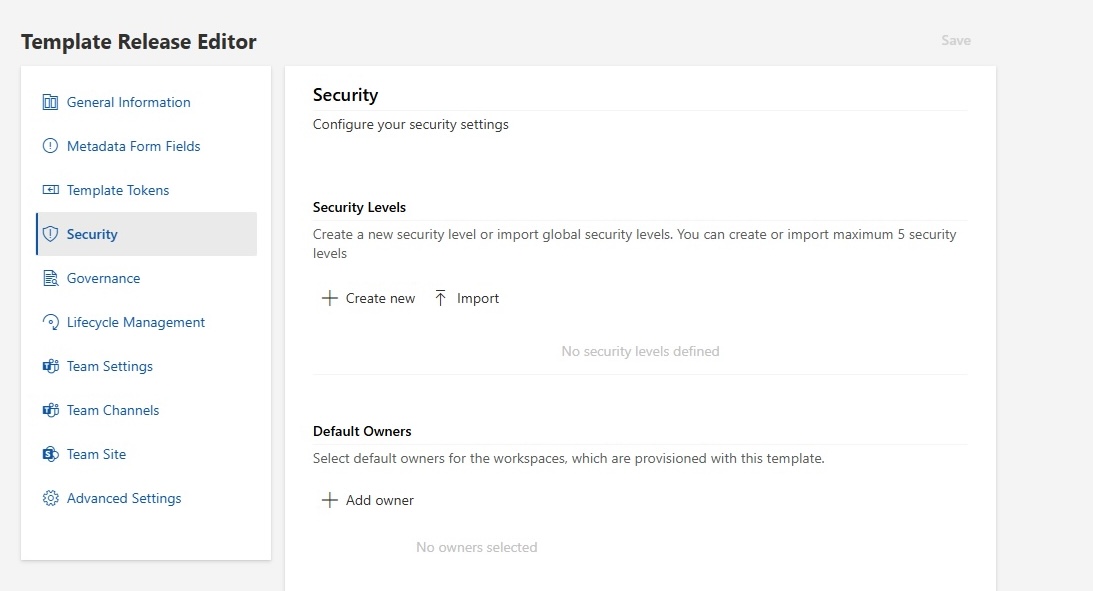
Default owners on Team templates are no longer a required field, because the workspace creator becomes a real Microsoft Teams owner at creation.
Considerations when planning your switch
- Tenant-wide scope. Standard Owners can be enabled for the entire Valprovia Governance environment at once, not for a single team, template, or subset of workspaces. Every governed team operates under the new ownership model once the setting is on.
- Detection cadence. Valprovia Governance detects changes made in the Microsoft Teams client on a sync cycle rather than immediately. For most tenants the reconciliation completes within minutes; at very large tenant scales it can take longer.
- Reconciliation is silent. When a policy-violating change is reverted, the workspace owner who made the change does not automatically receive a notification. They see the reverted state on their next refresh.
- Tag management moves into the Microsoft Teams client. Templates no longer configure Microsoft Teams tag rules; workspace owners set the tag policy directly in the Teams client. Templates that pre-configure tags at provisioning are worth reviewing before the switch.
| Aspect | Service Account | Standard Owners |
|---|---|---|
| Real Microsoft Teams owner | Valprovia Governance service account | Designated workspace owners |
| Workspace owners in Microsoft's model | Team members with owner-level rights inside Valprovia Governance | Real Microsoft Teams owners of their teams |
| Channel moderation | Configured through Valprovia Governance's channel workflow | Configured by workspace owners in the Microsoft Teams client |
| Archive, delete, restore | Through Valprovia Governance's lifecycle interface | Available in both Valprovia Governance and the Microsoft Teams client |
| Join-request handling | Handled through the Governance service account | Native emails and Teams-client prompts reach real workspace owners |
| Team tags | Configured through Valprovia Governance templates | Configured in the Microsoft Teams client; owners set who can manage tags |
| Governance policy enforcement | Applied at request time through Valprovia Governance | Detected and reconciled after changes occur in the Teams client |
| Scope of the setting | Default model | Tenant-wide setting |
A real-world scenario
Consider a large consulting firm running Valprovia Governance across four regional divisions, each with dozens of Teams for active client engagements. A partner requests moderated announcement channels in the leadership Teams of each division: only the partner and two delegates should be able to start conversations; everyone else reads and reacts.
Under Standard Owners, the partner and their delegates are real Microsoft Teams owners of their leadership Teams. They open the channel settings in the Teams client, enable moderation, designate themselves as moderators, and the change takes effect immediately. Valprovia Governance continues to enforce every rule the template defines - membership limits, guest policies, lifecycle rules - and reconciles any change that violates them. The partner gets the outcome they requested, and the Governance admin does not need to alter the template or step outside Valprovia Governance to accommodate the request.
In summary
Standard Owners is Valprovia Governance's next step in giving organisations both real Microsoft Teams ownership and enforceable governance policies at the same time. Every rule that makes your tenant governable stays in place. The workspace owners you designate become the actual owners of their teams. And the native Microsoft Teams capabilities that Microsoft reserves for real Team owners - from channel moderation to tag management to native archive - become available to them directly.
Frequently asked questions about Standard Owners
-
What are Standard Owners in Valprovia Governance?
Standard Owners is a capability in Valprovia Governance where the workspace owners your organisation designates become the real Microsoft Teams owners of their teams — the same as if they had created the team themselves in Microsoft Teams. The service account that used to hold the technical owner role steps aside. Real users own the team, while Valprovia Governance continues to enforce governance policies alongside them.
-
What can workspace owners do under Standard Owners?
With Standard Owners enabled, native Microsoft Teams capabilities become directly available: channel moderation; archive, delete, and restore from the Teams client; Microsoft's native join-request handling with emails and approval prompts; team tag management; and every team-level setting Microsoft exposes to real Team owners. For end users, a governed workspace feels the same as a native Microsoft Teams team.
-
Are my governance policies still enforced under Standard Owners?
Yes. Every rule in your templates — minimum and maximum member counts, guest and lifecycle policies — continues to apply. What changes is the enforcement point: Valprovia Governance detects governance-affecting changes shortly after they occur in the Teams client and reconciles the state through Microsoft Graph. If an owner adds a member beyond the maximum, the sync process brings the team back into line with the template.
-
Can Standard Owners be enabled for individual teams?
No. Standard Owners can be enabled for the entire Valprovia Governance environment at once — not for a single team, template, or subset of workspaces. Once the setting is on, every governed team operates under the new ownership model. It is a tenant-wide setting.
-
How quickly is a policy-violating change reverted?
Valprovia Governance detects changes made in the Microsoft Teams client on a sync cycle rather than immediately. For most tenants the reconciliation completes within minutes; at very large tenant scales it can take longer. Reconciliation is silent: when a policy-violating change is reverted, the workspace owner does not automatically receive a notification and sees the reverted state on their next refresh.


