


Are multiple owners enough to keep a Microsoft Teams workspace accountable?
No. Multiple owners give you failover, not accountability - and those are two different things. The common best practice of "at least two owners per team" is there to protect against an owner leaving: if one departs, a second remains. It does not solve the accountability problem of shared ownership: when a decision comes up that only one person needs to make, each of the two, five, or ten owners assumes another will handle it - and no-one does. More owners make this worse, not better. What is needed is not one more owner, but a named responsible owner - a Single Point of Contact (SPOC) per workspace - who makes clear who stands in, and whose assignment is restored automatically when it lapses.
When a review on a workspace comes due, it takes a person to answer it. In practice that is exactly what is missing: a workspace is technically managed by several owners, but none of them is clearly named as the business-side responsible one. That is the core problem of shared ownership - when the request lands with all of them, each assumes another will take it, and in the end no-one answers. And even where a contact was put on record, it only stays valid until that person leaves the company; after that the entry points at a name that no longer exists, with no-one to replace it.
This gap is what Valprovia Access Reviews grew this capability out of. Sending every review to all of a workspace's owners proved inefficient - so we funnel them to one clearly named person: the Single Point of Contact (SPOC). Two capabilities build on it: SPOC Election, which keeps that person current automatically and elects a successor whenever it is missing, and Workspace Review, the periodic check of whether a workspace is still needed at all. The review comes in two depths: a quick Keep-or-Archive decision on the standard tier, and on the professional tier a fuller review of members, external guests, permissions, and file-sharing.
SPOC Election: automated recovery of the workspace's single point of contact
The Single Point of Contact (SPOC) is an attribute held per workspace in the governance configuration: the one business-side person responsible for the workspace. It is that person - not the whole owner list - the environment addresses with its notifications: review requests, reports, and any other flow wired to the SPOC field. Whoever manages the workspace sees directly who that person is.
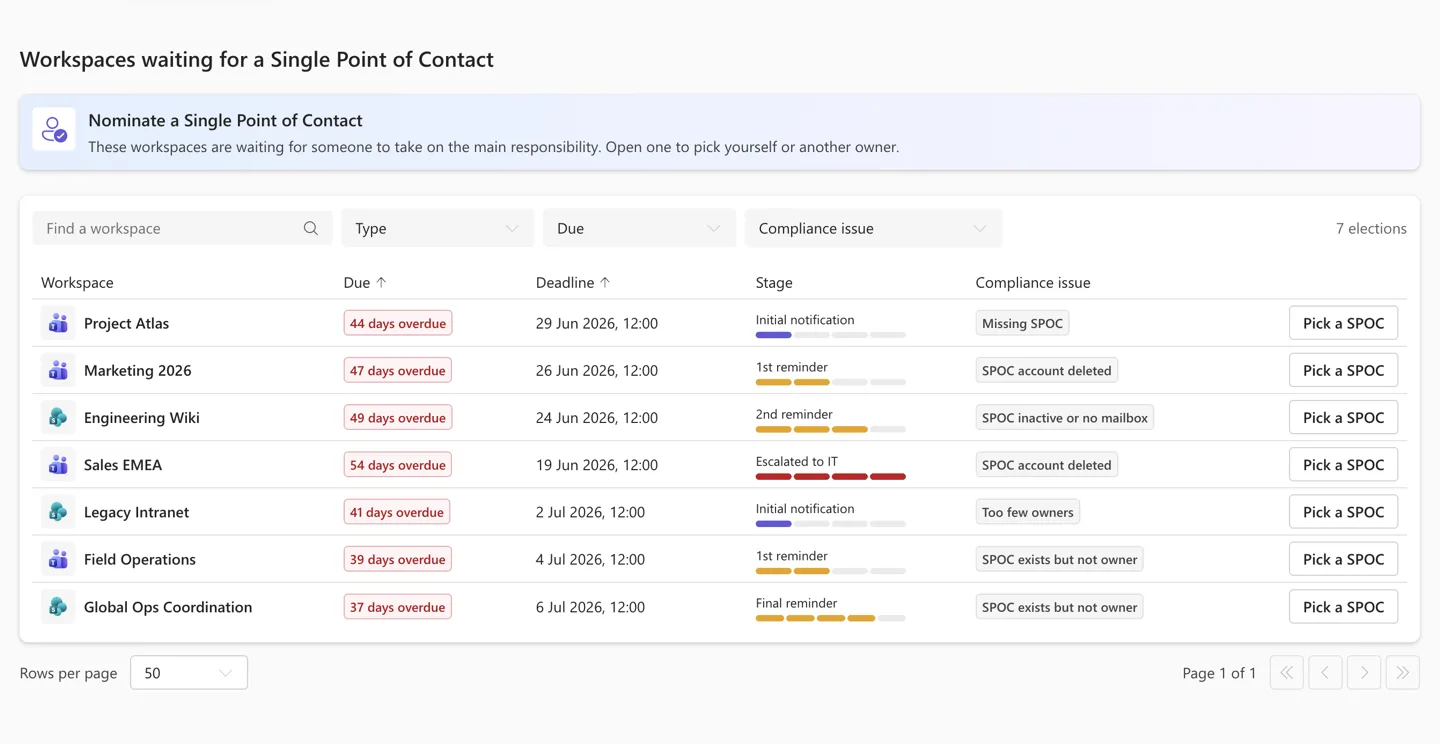
As soon as a workspace has no valid SPOC - because none was set, or the assigned person has left the company - the module detects the gap and opens an election addressed to the workspace's existing owners.
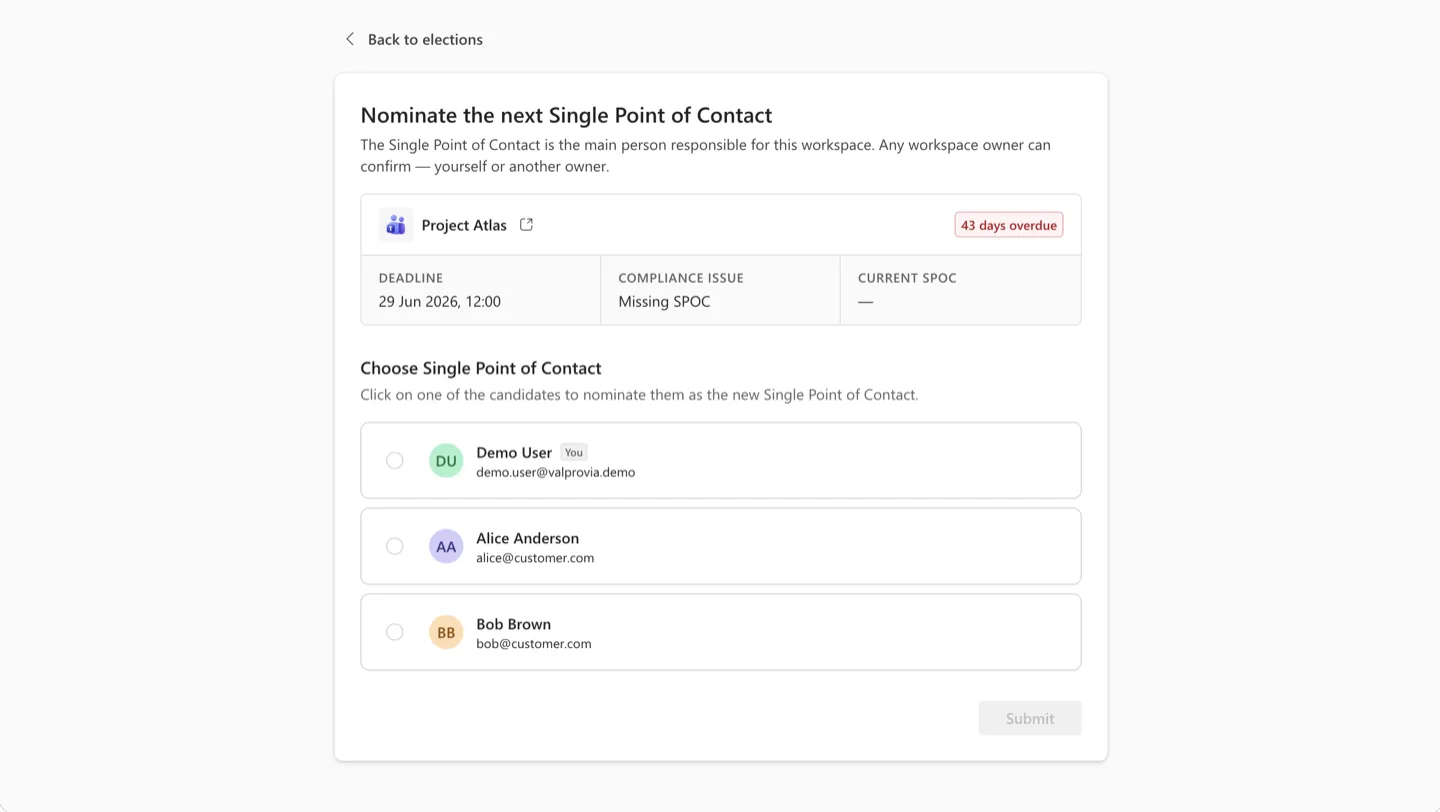
Each election runs through a defined lifecycle: an initial invite goes out; if no response is recorded, one and then a second reminder follow at configurable offsets; on the deadline the election escalates to the operations recipient, and if still unresolved it auto-cancels. First reply wins - the first owner to select a candidate ends the election immediately.
When the election resolves, the selected SPOC is written back to the workspace's governance configuration automatically. No hunt scripts, no bulk-fix runs, no ticket queue - the correction happens as the environment discovers the gap.
Looking ahead. A named SPOC per workspace opens the door to centrally driven compliance checks. If a Governance template disallows external guests, for example, but one turns up in a workspace anyway, that violation can be detected and addressed straight to the affected workspace's SPOC - and such checks can be rolled up into a compliance score per workspace. This central compliance control is the next step on the roadmap for this module; it is the Single Point of Contact, as one clearly addressable person, that makes it possible.
Workspace Review: periodic Keep-or-Archive on every governed workspace
Left alone, workspaces outlive their usefulness. A project wraps up, a team disbands, a vendor engagement ends - and the workspace stays, along with its documents, permissions, and storage footprint. The cost is quiet but real: storage that keeps growing on the Microsoft 365 bill, permission surfaces that keep expanding across the tenant, orphaned data that keeps showing up in eDiscovery and compliance audits with no clear owner to answer for it. The signal that the workspace is no longer needed lives with the people who used to work in it, not with the IT team - but until someone asks them, nothing changes.
As part of lifecycle management, the environment already ships automatic archiving, which decommissions workspaces once their activity signals go quiet. Workspace Review is an additional layer on top of that - it adds a scheduled human decision to the lifecycle: workspaces that are still nominally active (a scheduled sync writes to them, a background bot keeps them warm) but no longer serve a business purpose won't be caught by activity alone, and governance policy often wants a human confirmation on every workspace regardless.
The module ships in two tiers, so the depth of the review matches what each customer needs:
Standard tier - a single yes-or-no decision on the workspace: Keep or Archive. The decision is scoped deliberately to "do I still need this workspace?" so an owner can answer quickly, at the schedule your governance policy defines (for example, every six months), without needing to reason through the workspace's contents.
Professional tier - a deeper review that exposes the workspace's individual members and external guests, its file-sharing configuration, custom permissions, and settings, so the reviewer can decide with the full picture in view. On this tier the review is not only Keep-or-Archive: it is an opportunity to correct membership and permission drift at the same time.
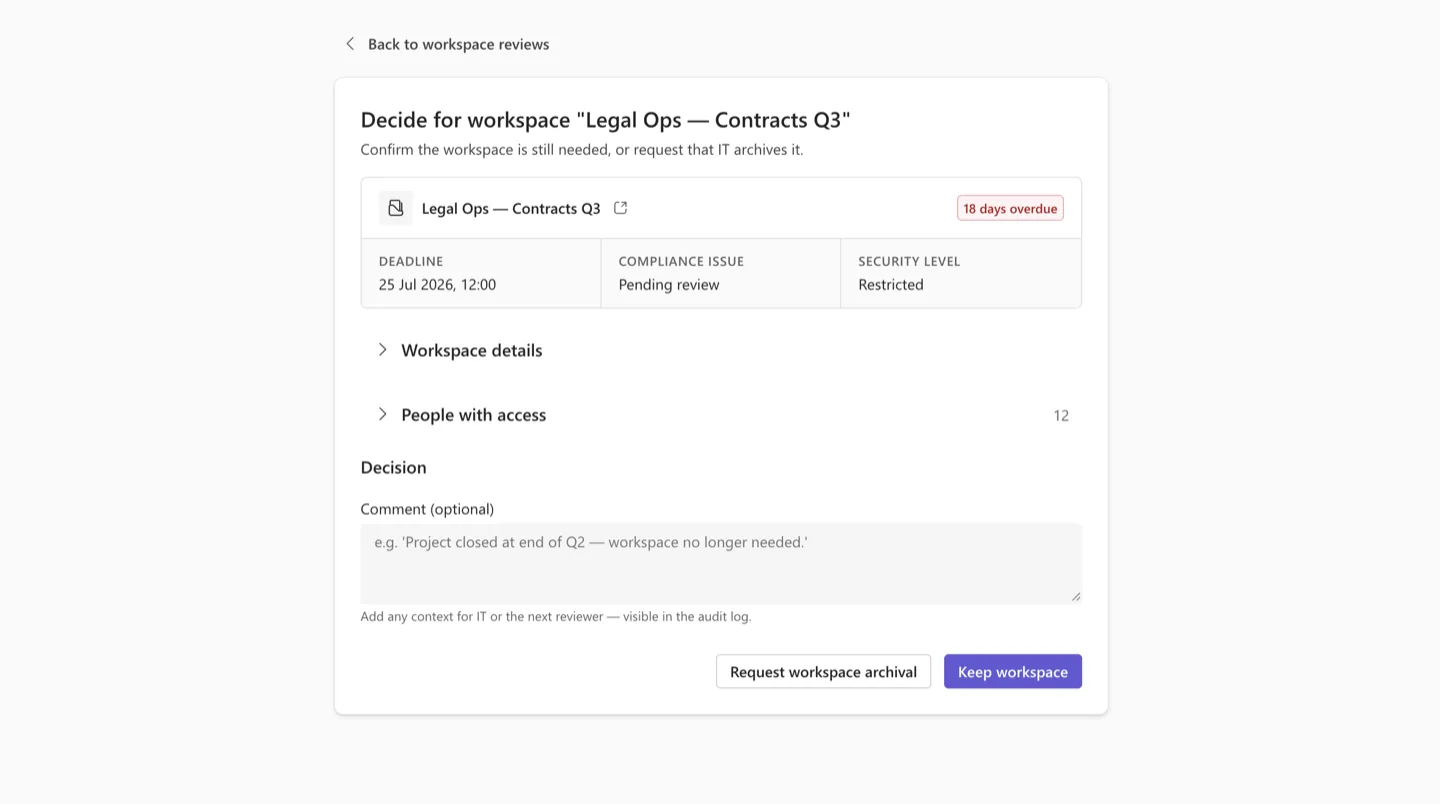
If no decision is recorded, up to three reminders follow at template-configured offsets. On the deadline, the timeout action defined by the template applies: archive-and-notify soft-archives the workspace and lets the owner know, or notify-only mails the IT recipient so a human decides. As with SPOC Election, the first decision from any owner ends the review immediately.
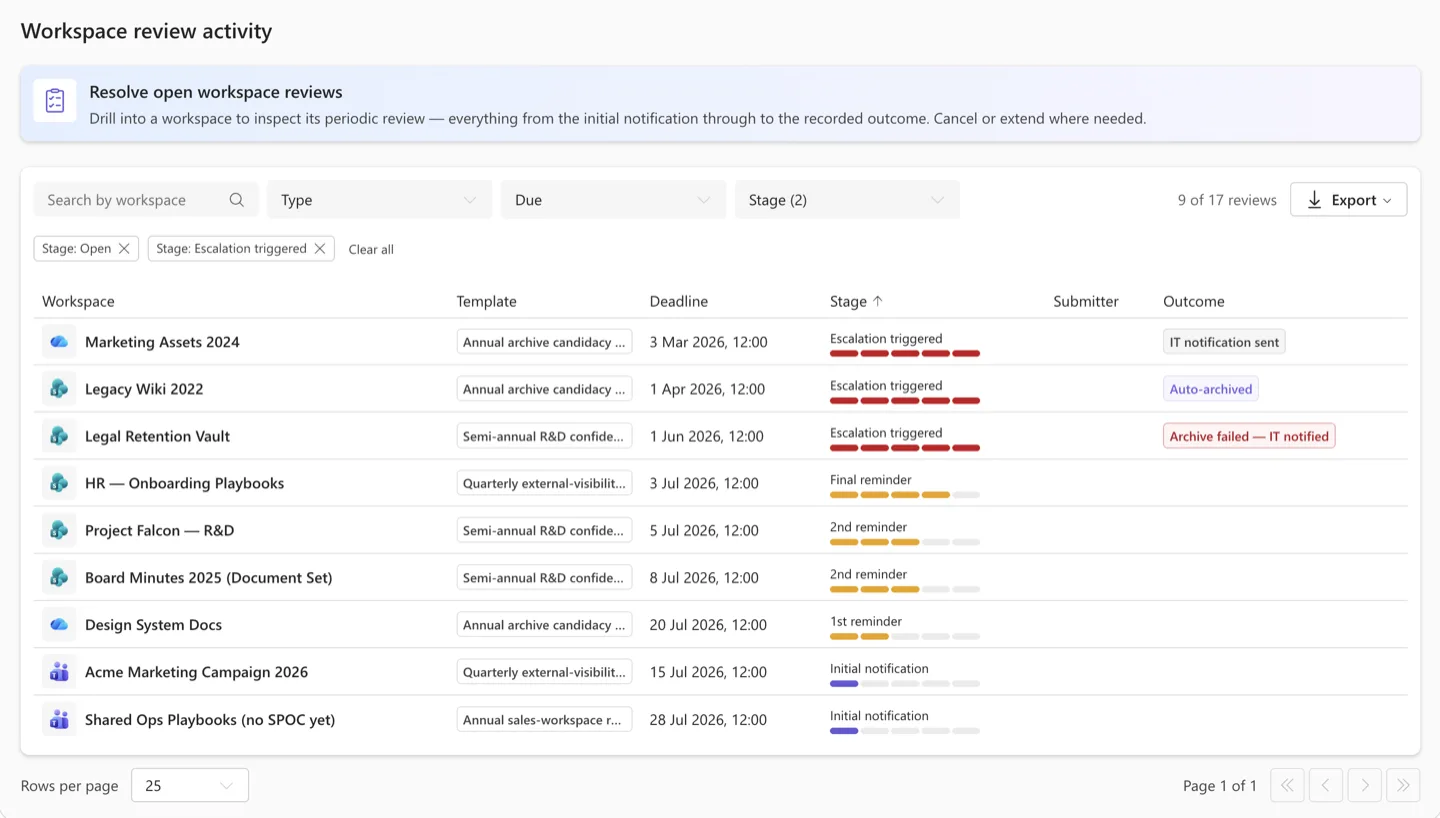
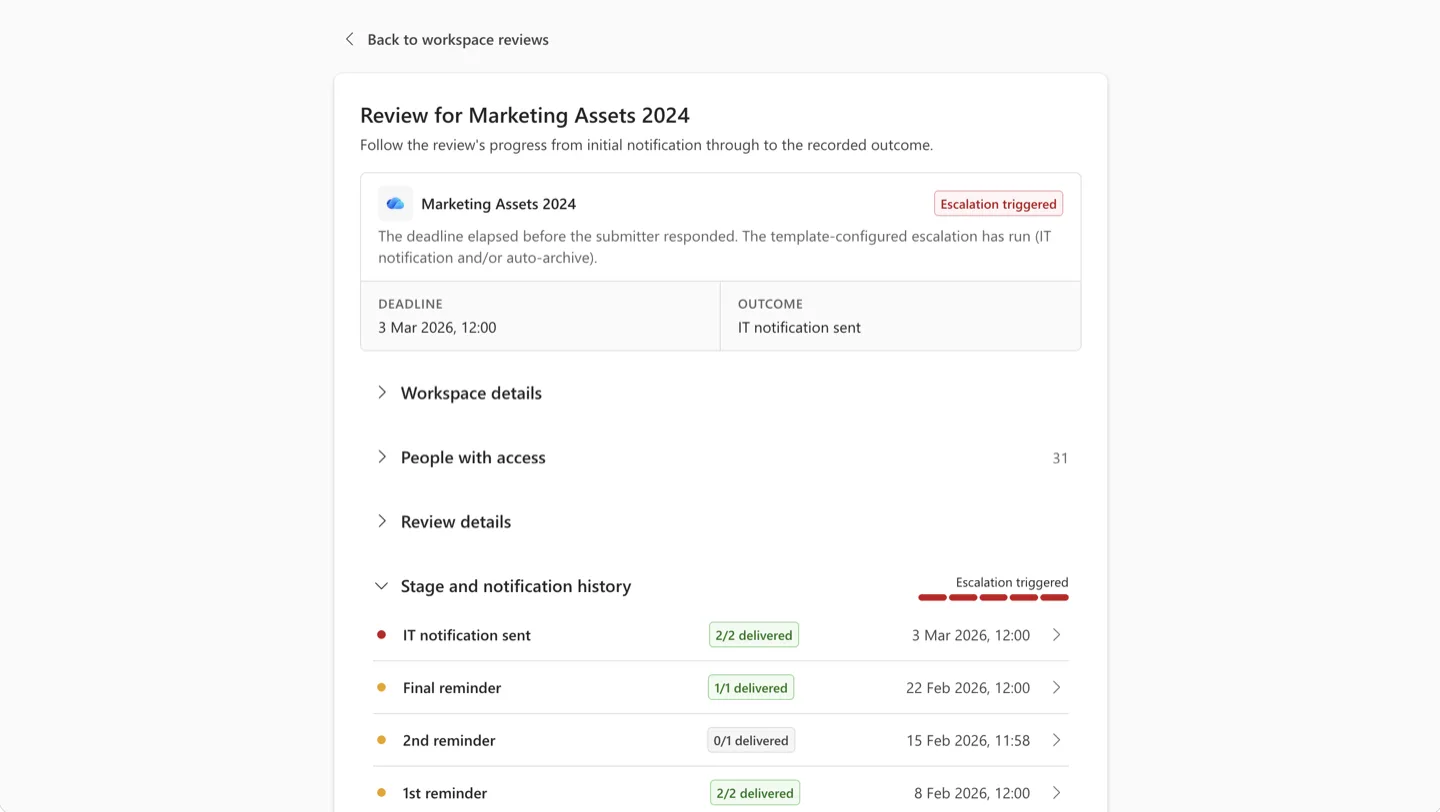
The effect is that stale workspaces get closed by the people who actually owned them, at the rhythm your governance policy defines, rather than by an IT team hunting through a spreadsheet.
What admins configure
The controls the module surfaces to admins are deliberately compact - and where possible they reuse the Governance templates admins already maintain.
Per Governance template:
- Which Governance templates participate in workspace reviews - opt-in per template
- Review cadence and reminder offsets per template
- Timeout action per template - archive-and-notify or notify-only
- The IT recipient notified on Workspace Review timeouts, per template
Per environment (once for the whole deployment):
- Whether SPOC Election is enabled at all - a single environment-level toggle that applies to every workspace once on
- The escalation recipient for unresolved SPOC elections
- The Entra security group whose members are authorised to respond - one group per environment, shared across SPOC and Workspace Review or configured separately
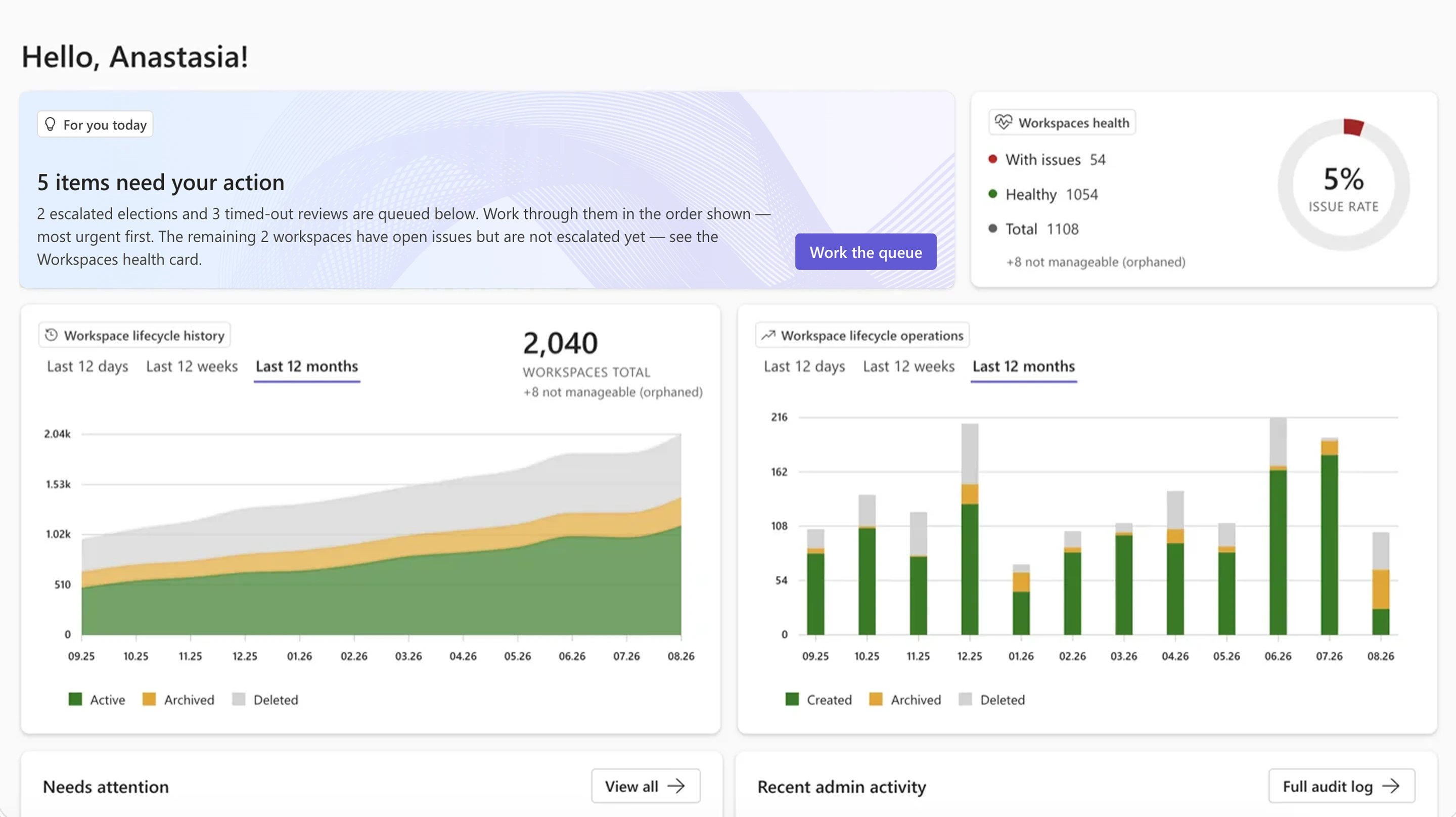
What owners see
For a workspace owner, this is a low-friction task: a notification when a decision on their workspace is needed, the workspace's current context in view - owners, members, guests - and a single action to record the choice. Any of the workspace's owners can complete it.
In summary
The people who know whether a workspace still matters are almost never in IT - they are the people who worked in it last, and their answer is quick to give when the question reaches them at the right moment. What has traditionally made lifecycle governance heavy is not the decisions themselves but the bookkeeping around them: who is accountable for this workspace, how the environment reaches them, how anyone confirms the name on file is still current.
This module removes that bookkeeping. Each workspace names its own SPOC; SPOC Election keeps that name valid on its own, without asking anyone to check; and Workspace Review turns "does this still belong?" into a scheduled question - with a Keep-or-Archive answer on the standard tier, or a fuller membership-and-permissions review on the professional tier when the decision needs more context. IT keeps the oversight and the escalation path; the decisions themselves land with the people who can actually make them.
How to get SPOC Election and Workspace Review
SPOC Election and Workspace Review are part of Valprovia Access Reviews. If you would like to evaluate them for your environment, please get in touch and our team will take you through what is required for your setup.
Frequently asked questions about owner accountability in Microsoft Teams
-
How many owners should a Microsoft Team have?
The common best practice is at least two owners per team - this gives you failover if one owner leaves the company. It is not enough for accountability, though: with several owners, each assumes another one is on it. That is why a named responsible owner (a Single Point of Contact) per workspace complements the two technical owners with one clearly responsible person.
-
What is a Single Point of Contact (SPOC) for a Teams workspace?
A Single Point of Contact is the one business-side responsible person per workspace, named from among the owners. It is that person - not the whole owner list - that the environment addresses with review requests, reports, and notifications. So on every decision it is clear who is responsible, instead of responsibility diffusing across several owners until no-one carries it.
-
What happens when the responsible owner leaves the company?
When the responsible owner leaves or loses their licence, the module detects that the workspace no longer has a valid Single Point of Contact and automatically starts a time-boxed election among the remaining owners. If no-one responds for a while, reminders follow and finally an escalation. The first owner to confirm sets the new SPOC - with no manual follow-up from IT.
-
How do you periodically decide whether a Teams workspace is still needed?
Workspace Review asks the responsible owner on a set cadence (for example every six months) whether to keep or archive the workspace. On the standard tier this is a quick Keep-or-Archive decision; on the professional tier it adds a review of members, external guests, permissions, and file-sharing. If no answer is given, a template-defined timeout action applies.


