


Introduction
The Valprovia MCP Server exposes Microsoft 365 governance as standard MCP tools. Operations like provisioning, access management, security enforcement, and lifecycle management for Microsoft Teams and SharePoint become accessible to Copilot-based agents and AI workflows for automation.
Announcing the Valprovia MCP Server
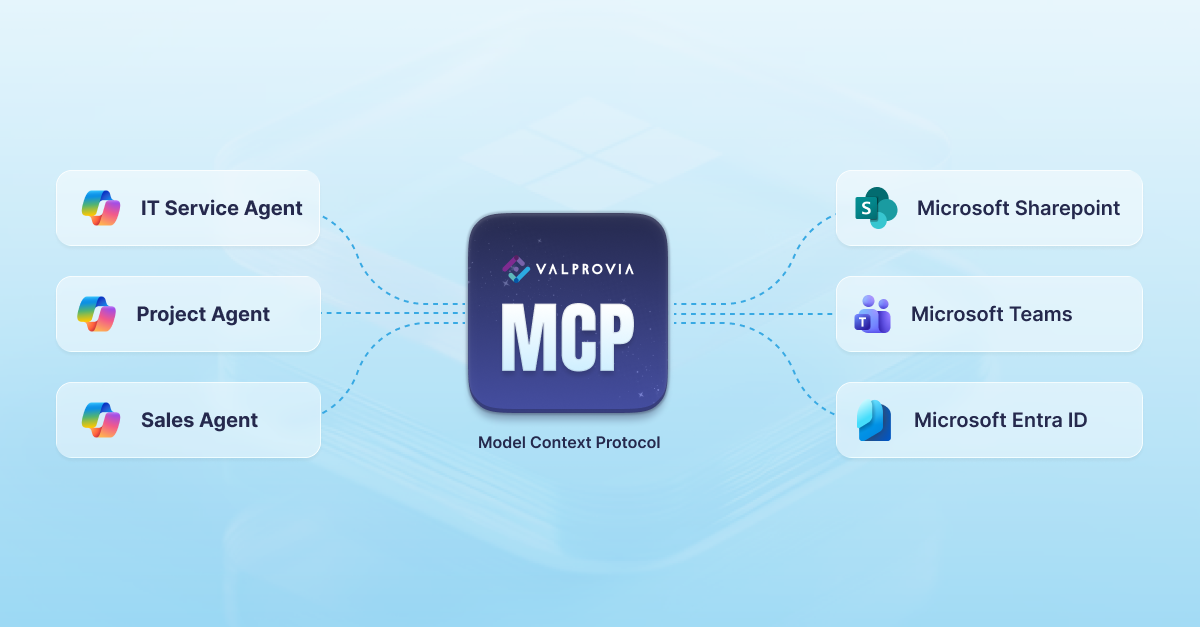
Valprovia previously introduced the Copilot Agent that brings governance directly into Microsoft 365 Copilot chat. Now the company is announcing "the Valprovia MCP Server – the Microsoft 365 governance backend that AI agents and workflows can call via the Model Context Protocol (MCP)."
The roadmap includes integrating all Valprovia products into the MCP server, including the Integration Module.
Quick Refresher: What is MCP?
The Model Context Protocol is an open standard for connecting AI applications to external systems, data sources, tools and workflows.
MCP Components:
- MCP client/host: The AI app or agent (Copilot-based agent, bot, custom agent)
- MCP server: Exposes capabilities as tools, such as creating Teams workspaces, finding collaboration spaces, extending guest access, and archiving inactive teams
The MCP server translates operations into systems like Microsoft 365 and returns structured results.
What is the Valprovia MCP Server?
The Valprovia MCP Server implements MCP on top of the Valprovia Governance Module. Operations the Copilot Agent performs — creating project workspaces from templates, managing owners/members/guests, enforcing security levels, and handling lifecycle — become accessible as standard MCP tools for use by multiple agents and workflows. Every call is validated against the same preventive Microsoft Teams governance rules that apply to human users.
Key distinction: "This is not an 'AI governance' product. It is a Microsoft 365 governance solution that becomes accessible to AI."
Bring Your Own (Copilot) Agent
Modern organizations deploy multiple agents:
- Built-in Microsoft 365 Copilot experiences
- Copilot Studio agents for specific business processes
- Line-of-business bots and Teams apps
- Internal orchestration agents
The Valprovia MCP Server enables any MCP-capable agent or workflow to discover Valprovia tools, call them with parameters, and receive governance-safe results. Organizations maintain one governance layer across multiple agent scenarios: "Bring your own Copilot agent – the Microsoft 365 governance layer stays the same: Valprovia MCP."
Governance Everywhere in Microsoft 365
Modern governance controls:
- Which templates are used for departments/project types
- Naming conventions and tagging for Teams and SharePoint sites
- Owner, member, and guest permissions
- Guest access validity periods
- Archive and deletion policies
The Valprovia MCP Server maintains "one rule set defined centrally for Microsoft Teams and SharePoint" while enabling "multiple access paths" and ensuring "consistent behavior regardless of which agent triggered the action."
When AI agents automate Microsoft 365 tasks, they call Valprovia MCP, which: (1) checks governance rules, (2) performs allowed operations, (3) returns structured results.
Integration Scenarios: How Agents Use Valprovia MCP
1. Project Delivery Agent
A Project Delivery Agent connected to CRM or project systems:
- When a project is marked "won," the agent calls Valprovia MCP to create a Teams team and corresponding SharePoint site from the correct template
- Applies security levels and naming conventions
- Adds core project team members
- Sets lifecycle rules (e.g., archive after project closure)
Result: Projects automatically receive governed Teams and SharePoint setups following the same playbook.
2. Sales Agent for SharePoint & Teams Structures
A Sales Agent supports account teams by:
- Collecting information about new opportunities
- Calling Valprovia MCP to create or reuse correct Teams workspace
- Configuring associated SharePoint site with folder structures and metadata
- Setting permissions based on governance rules
Result: Sellers collaborate in governed Teams and SharePoint locations automatically.
3. IT Service Agent for Support Tickets
An IT Service Agent handles common tickets:
- "I can't find my project team"
- "Please add this colleague to our customer team"
- "Extend guest access for this partner by 30 days"
The agent calls Valprovia MCP to search for Teams and SharePoint sites, check archive status, restore if allowed, manage members/guests, or explain why access isn't permitted. One integration handles all ticket types.
How Valprovia Copilot Agent and Valprovia MCP Server Fit Together
The Valprovia Copilot Agent is the Copilot-native UI for Microsoft Teams users. The Valprovia MCP Server is the governance backend that agents call to automate Teams and SharePoint. MCP Server, Copilot Agent, REST API and CLI together make up Valprovia's headless access layer, which exposes every governance function programmatically.
- Users interact with the Copilot Agent in natural language within Teams
- The agent delegates work to the Valprovia MCP Server
- Other Copilot-based agents, Teams bots, and workflows can call the same MCP tools directly
- Multiple agents don't duplicate governance logic; all connect to one layer: Valprovia MCP
This is Just the Beginning: Valprovia MCP as the Platform
The Valprovia MCP Server currently integrates the Governance Module, but "all Valprovia products will be integrated into Valprovia MCP," including the Integration Module and other components handling provisioning, integration, lifecycle, and automation.
Valprovia MCP will become "the common interface" for AI agents to orchestrate Teams and SharePoint, connect external systems into governed patterns, and automate workflows without bypassing IT and compliance.
In One Sentence
If you want Microsoft 365 governance for Microsoft Teams and SharePoint to be part of your Copilot and agent strategy, the Valprovia MCP Server is the missing piece: It turns your Valprovia setup into a standard MCP server, so AI agents can automate Teams and SharePoint with your governance – not around it.
Frequently asked questions about the Valprovia MCP Server
-
What is the Valprovia MCP Server?
The Valprovia MCP Server is an MCP-based backend service exposing Microsoft 365 governance via the Valprovia Governance Module as standardized tools for Copilot agents and AI-driven workflows.
-
How is the Valprovia MCP Server different from the Valprovia Copilot Agent?
The Copilot Agent is the UI inside Microsoft 365 Copilot. The MCP Server is the governance backend this agent — and others — calls to execute Microsoft 365 actions.
-
Is the Valprovia MCP Server an AI governance product?
No. It's a Microsoft 365 governance solution making existing governance rules accessible to AI agents rather than inventing new "AI policies."
-
What tasks can the Valprovia MCP Server automate?
Through Valprovia MCP, AI agents can create and manage Microsoft Teams workspaces and SharePoint site collections, manage owners/members/guests, enforce security levels, and control lifecycle — always within governance rules.
-
Does the Valprovia MCP Server only work with Microsoft 365 Copilot?
The primary focus is Microsoft 365 and Copilot scenarios, but any MCP-capable agent or workflow can use Valprovia MCP to automate Microsoft 365 tasks in governance-compliant ways.
-
Do I need the Valprovia Governance Module to use the MCP Server?
Yes. The MCP Server is built on top of the Governance Module and uses its templates, policies, and processes.
-
What role do Microsoft Teams and SharePoint play?
They are at the core of Valprovia MCP, including site collections connected to Teams groups and standalone SharePoint sites. Workspaces, permissions, and lifecycle are controlled through MCP tools.
-
How does the Valprovia MCP Server support our Copilot strategy?
It makes Microsoft 365 governance natively available to Copilot agents, enabling automation of Teams and SharePoint without bypassing governance since all actions run through Valprovia MCP.
-
Can business teams use their own AI agents with Valprovia MCP?
Yes. Business teams can build their own Copilot agents or workflows calling Valprovia MCP — like project delivery, sales, or IT service agents that automatically provision Teams and SharePoint structures according to rules.
-
Which other Valprovia products will be integrated into Valprovia MCP?
The MCP Server starts with the Governance Module. Over time, products like the Integration Module will be added so AI agents can use more Valprovia capabilities via MCP.
-
Why is the Valprovia MCP Server "the missing piece" of our Copilot strategy?
Because it brings Microsoft 365 governance natively into Copilot and agent strategies, enabling "AI agents to automate Microsoft 365 with your governance – not around it."


