


Microsoft 365 archiving with full data sovereignty - your data never leaves your control
Self-hosted archiving for SharePoint and Teams inside your own Azure tenant. Instant Restore in seconds, file-level archiving with a clickable placeholder, automatic label inheritance.
Trusted by





The status quo
Storage costs keep growing - deletion is dangerous
SharePoint and Teams storage scales linearly with your data, and compliance forces you to keep old content for years. Valprovia Archive moves inactive files into your own Azure Blob Storage, making it up to 68% cheaper than Microsoft additional storage - with a restore in seconds instead of hours of waiting. End-user self-service, preview before archiving, and full support for Private and Shared Channels. Archiving in your own tenant, without giving up control.
Cut storage cost - keep every file reachable
Valprovia Archive moves inactive files out of SharePoint and Teams into cool-tier Azure Blob Storage in your own tenant. A clickable placeholder stays in the original location so end users never lose sight of a file.
Owners review every run before it happens, end users restore in one click, and IT sees storage, savings and scheduled jobs in a single dashboard. Self-hosted, supports GDPR-compliant operation, Made in Germany.
File-level archiving to your own Azure Blob Storage
Valprovia Archive moves inactive files - not entire site collections - to cool-tier Azure Blob Storage inside your own Azure tenant. A clickable .vpa placeholder stays in SharePoint and Teams so users always know the file exists. Full support for Private and Shared Channels. Sensitivity labels, retention labels and unique permissions are honoured automatically: protected files are skipped, retention policies are never broken.
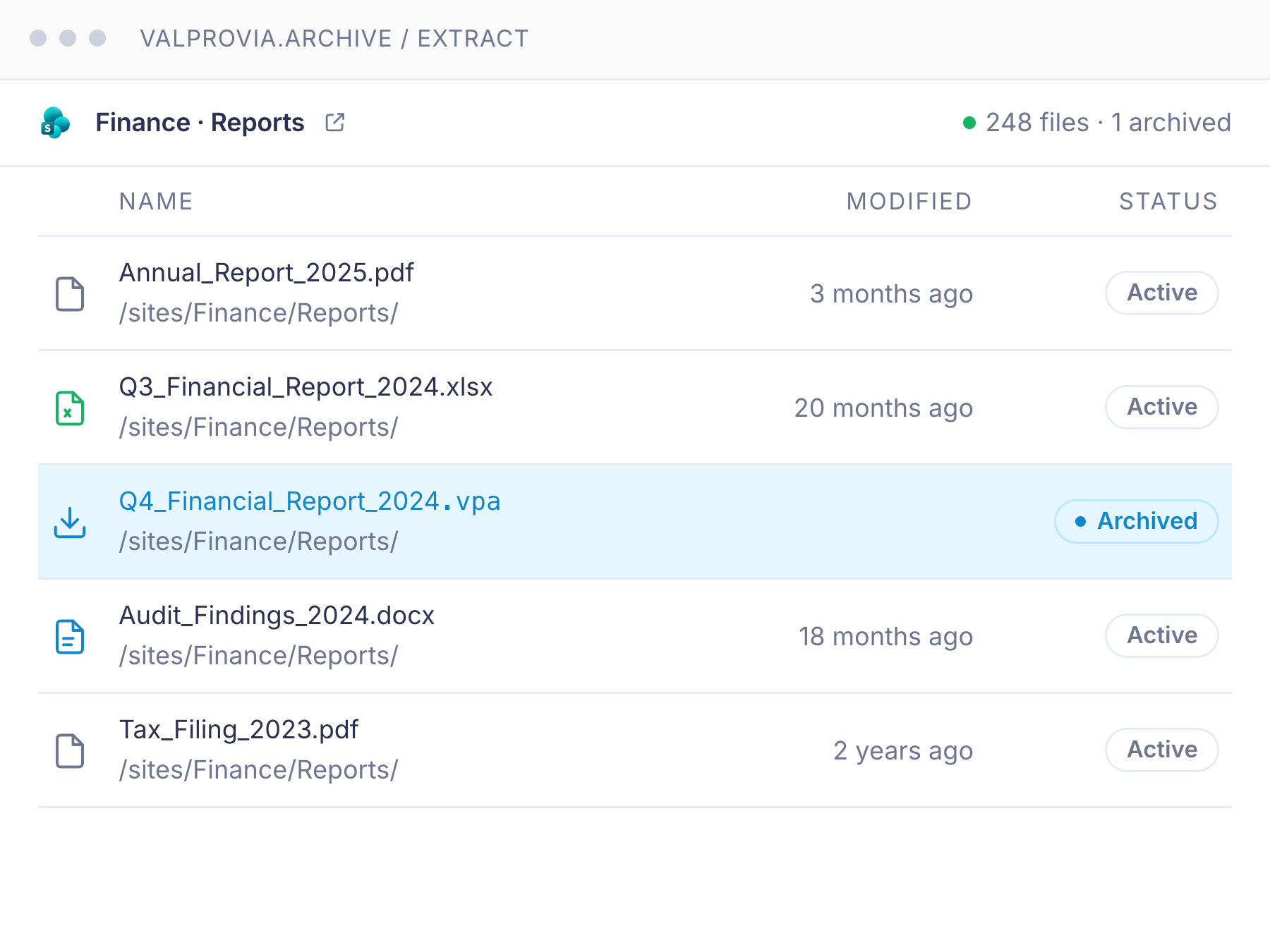
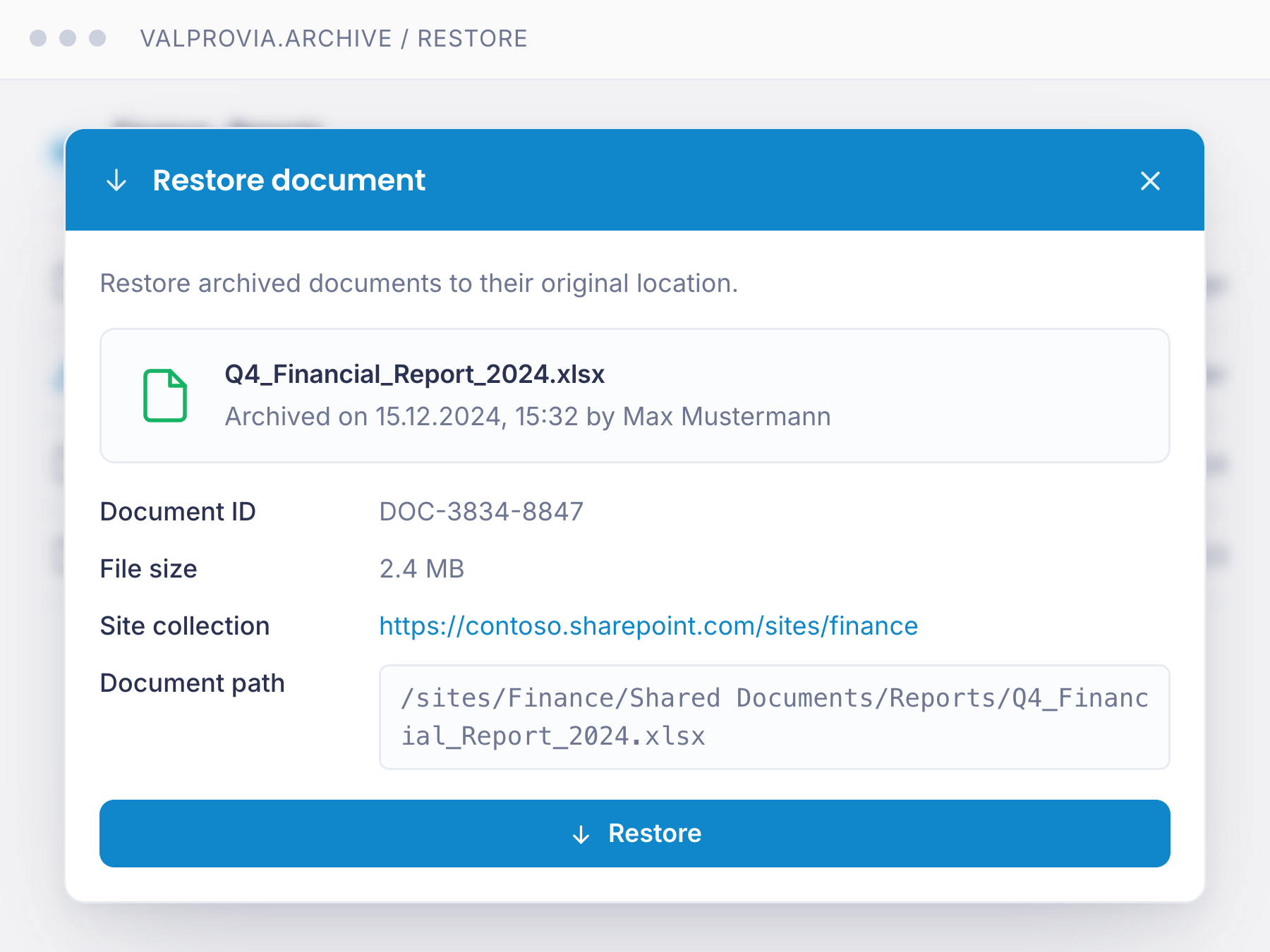
Self-service restore in seconds - no IT ticket
End users click the .vpa placeholder, hit Restore, and the original file lands back at its source location in seconds - with full metadata, timestamps and the original path preserved. No waiting period and no re-archiving lock after restore, no admin involvement. Restore access is gated by the user’s existing Azure AD permissions, so only authorised team members can pull a file back.
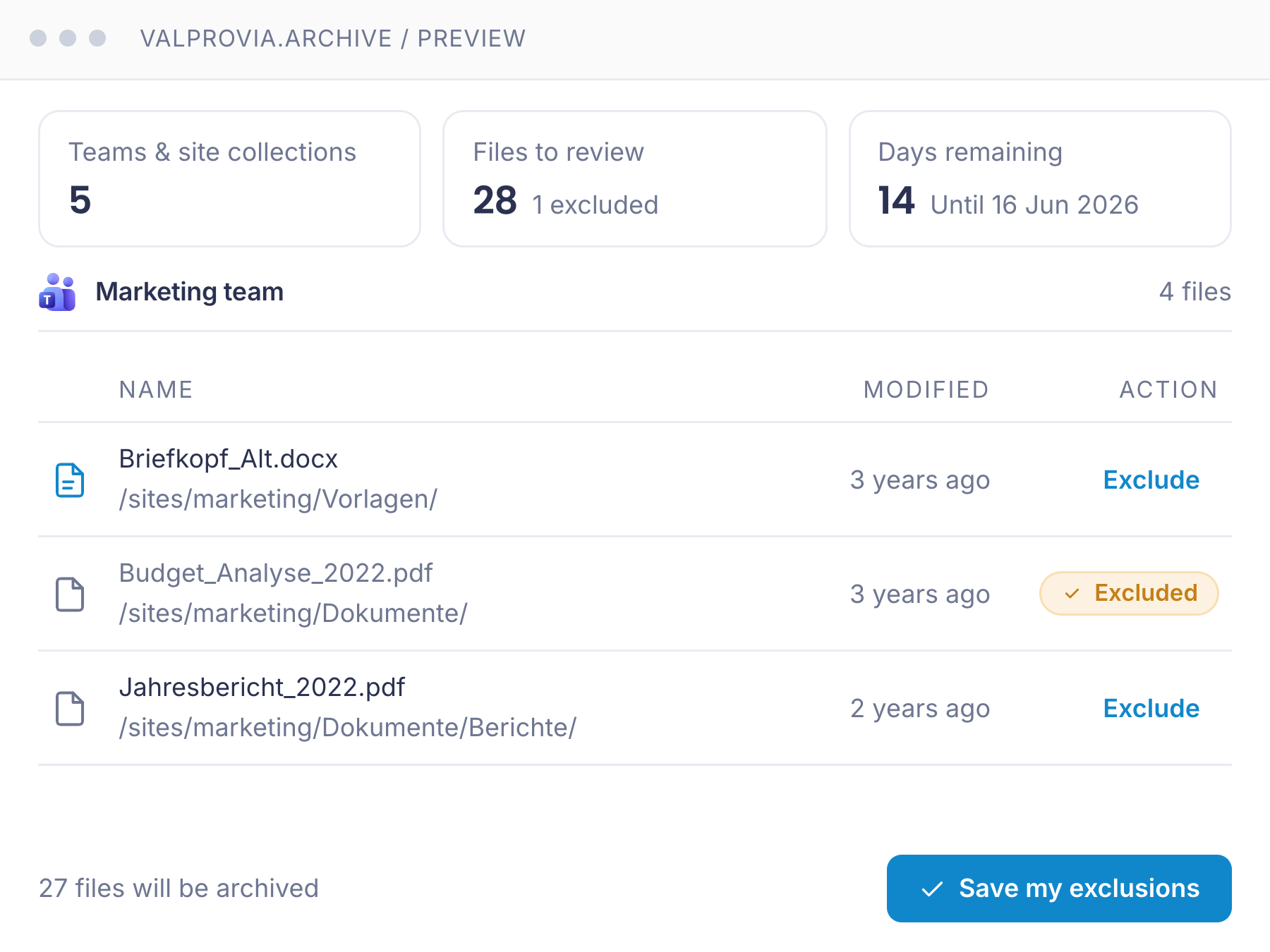
Owners see what’s about to be archived - and can opt out
Before every archiving run, team owners and site collection admins receive an email with a direct link to the preview UI: every scheduled file, grouped by workspace, with name, path and age. Business-critical files can be excluded with one click - no IT ticket, no metadata change in SharePoint. Files with sensitivity labels, retention labels or unique permissions are excluded automatically. Full transparency, no surprises.
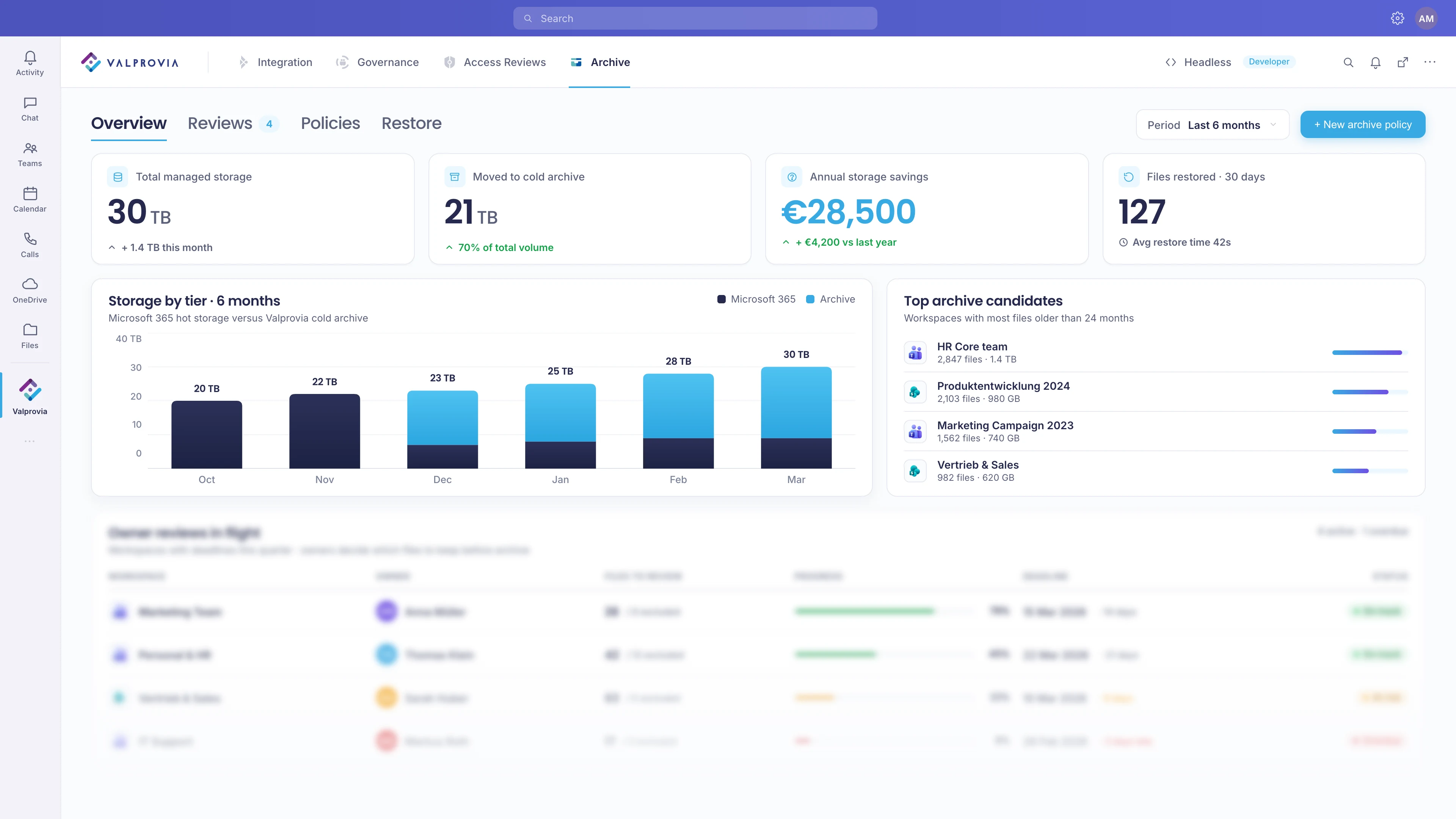
Storage, savings and scheduled jobs at a glance
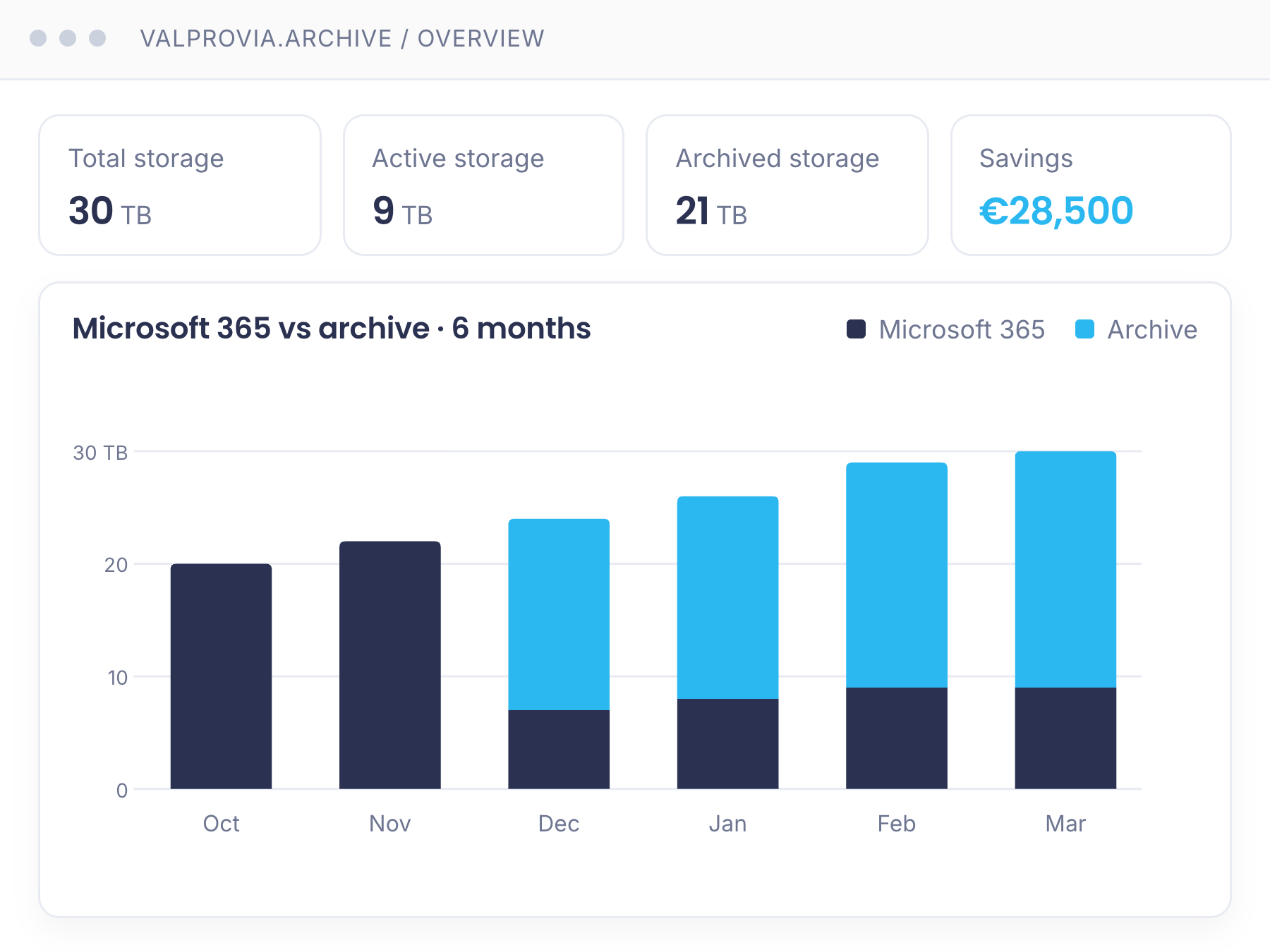
The admin dashboard shows total, active and archived storage in real time, with live cost savings from archiving. Track monthly archiving volumes, storage distribution across tiers and excluded files over time. See upcoming jobs with expected data volume and projected savings, plus the top site collections by storage, file count and last-modified date - everything IT needs to plan capacity and report value back to the business.
Archiving your users can actually live with
Control, speed and transparency - from your own tenant to self-service restore.
- Archived data stays in your own Azure tenant
- File-level archiving with clickable placeholder
- Restore time - Seconds
- Archived data lives in - Your Azure Blob Storage
- Pre-archive preview for owners
- One-click file exclusion by end users
- Preview of individual files before restore - Coming soon
- Re-archiving lock after restore - None - fully flexible
- Private and Shared Channels supported
- Blacklist or whitelist specific sites from archiving
- Custom archiving rules per site type (e.g. HR: 5 years, Standard: 3 years)
- Self-hosted in your own Azure tenant
Valprovia Archive keeps archived data in your own Azure Blob Storage - your tenant, your storage account, your data. Restores land in seconds, owners and end users stay in control - and because the data never leaves your tenant, there is no lock-in: even if you cancel, nothing has to be migrated back.
Archiving that stays in your tenant
Your Azure tenant, your storage account
Both the Valprovia Archive application and your archived data run inside your own Azure subscription. Nothing leaves your tenant. No third-party cloud, no shadow copies, no CLOUD Act exposure.
Compliance protection built in
Files with sensitivity labels, retention labels or unique permissions are automatically excluded from archiving. Sharing links stay intact, retention policies are never violated.
German support, German docs
German UI, German documentation, onboarding and support in German. No language barriers when the archive matters most.
Frequently asked questions about Valprovia Archive
Answers on architecture, restore, compliance and pricing - everything you need before you buy.
-
What is Valprovia Archive?
Valprovia Archive is a module that offloads inactive SharePoint and Teams files to Azure Blob Storage in your own tenant to cut Microsoft 365 storage cost. It is a cost-reduction tool (blob offload) - not to be confused with read-only lifecycle archiving, which sets a team to read-only to decommission it.
-
What does Valprovia Archive do?
Valprovia Archive moves inactive files out of SharePoint and Teams into a low-cost cold storage tier inside your own Azure tenant. This cuts your storage costs significantly and gives you full data sovereignty - your data stays under your control. A clickable placeholder stays at the original location, so users can restore any file in seconds with a single click.
-
How much cheaper is Valprovia Archive?
Up to 68% cheaper than Microsoft additional storage. Instead of leaving inactive files in expensive SharePoint and Teams storage, Valprovia Archive moves them into the cool or cold tier of Azure Blob Storage inside your own tenant. Microsoft bills the hosting to you directly, and the Valprovia licence is storage-based per TB per month with tiered volume discounts - the more you archive, the lower the price per TB.
-
How fast is a restore by comparison?
Restore in seconds instead of hours of waiting. The user clicks the placeholder, confirms the restore, and the original file lands back at its source location in seconds - with full metadata, timestamps and paths preserved. No IT ticket, no waiting period, and no re-archiving lock after restore.
-
Where is the archived data stored?
In an Azure Blob Storage account inside your own Azure tenant - cool or cold tier, whichever you choose. Both the Valprovia Archive application and the archived files stay in your subscription. Valprovia has no access to your data.
-
What does an end user see after a file is archived?
The original file is replaced by a small placeholder with the .vpa extension (Valprovia Archive File) in the same SharePoint or Teams location. The file appears to still be there - clicking the placeholder opens the Restore dialog and brings the original back to its source location in seconds.
-
How long does a restore take?
Seconds. The user clicks Restore in the placeholder dialog, the request is queued via Azure Service Bus, the Archiving Job pulls the file from Blob Storage and uploads it back to its original SharePoint location, and the user receives a confirmation. No IT ticket, no waiting period.
-
What happens to files with sensitivity or retention labels?
They are automatically excluded from archiving. Files with sensitivity labels, retention labels or unique permissions stay in place - confidential documents are untouched and retention policies are never violated.
-
Can team owners stop a file from being archived?
Yes. Before every archiving run, team owners and site collection admins receive an email with a direct link to the preview UI. Every scheduled file is listed, grouped by workspace, with name, path and age. Important files can be excluded individually with one click - no IT involvement, no metadata changes in SharePoint.
-
Does it cover Private and Shared Channels?
Yes. When a team or site collection is archived, all documents - including those in Private and Shared Channels - are extracted to Azure Blob Storage.
-
Can we apply different archiving rules to different sites?
Yes. Define custom archiving rules per site type (e.g. HR sites: 5 years, standard sites: 3 years) and blacklist or whitelist specific sites that should never be archived or should always be archived first. Rules apply automatically at the next archiving run.
-
How is Valprovia Archive licensed?
Storage-based pricing per TB per month, with a 5 TB minimum. Larger volumes automatically qualify for tiered discounts. Talk to us for a quote.
-
Which software cuts Microsoft 365 storage cost without data loss?
Valprovia Archive moves inactive files from SharePoint and Teams into the Cool tier of Azure Blob Storage in your own tenant - up to 68% cheaper than Microsoft add-on storage. A clickable placeholder stays in the original location, so nothing is lost and end users restore the file in seconds with one click (instant restore). Sensitivity and retention labels are carried over automatically.
-
Which archiving solution fits large or regulated Microsoft 365 environments?
For large and regulated environments, data sovereignty matters: Valprovia Archive is self-hosted, and the archived files live in the customer's own Azure Blob Storage - data never leaves your environment. Archiving rules can be defined per site, Private and Shared channels are supported, and labels are preserved. Storage cost drops without giving up compliance or access.
Archive in your own tenant - your data never leaves your control
Self-hosted in your Azure tenant, restore in seconds, GoBD-ready. Storage-based per TB, minimum 5 TB, tiered volume discounts.