Microsoft Solutions Partner

Microsoft 365 Access Reviews -
Copilot-safe and audit-ready

Owner-led access reviews and tenant-wide visibility for SharePoint, Teams and OneDrive. Configure right, review what drifted, prove it to the auditor - without PowerShell and without Site Collection Admin rights for end users.

Read-only by default Self-hosted available EU data residency
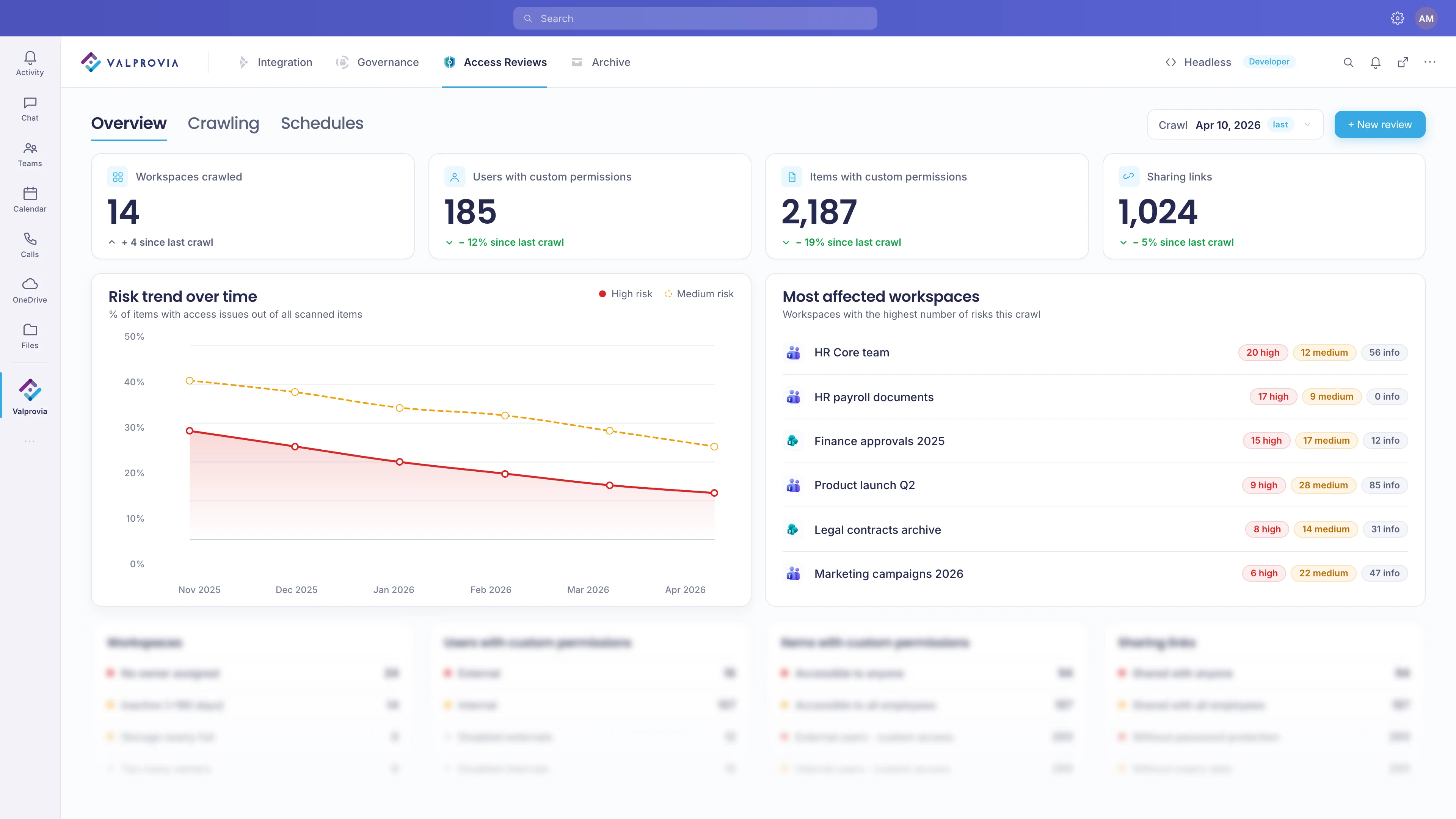
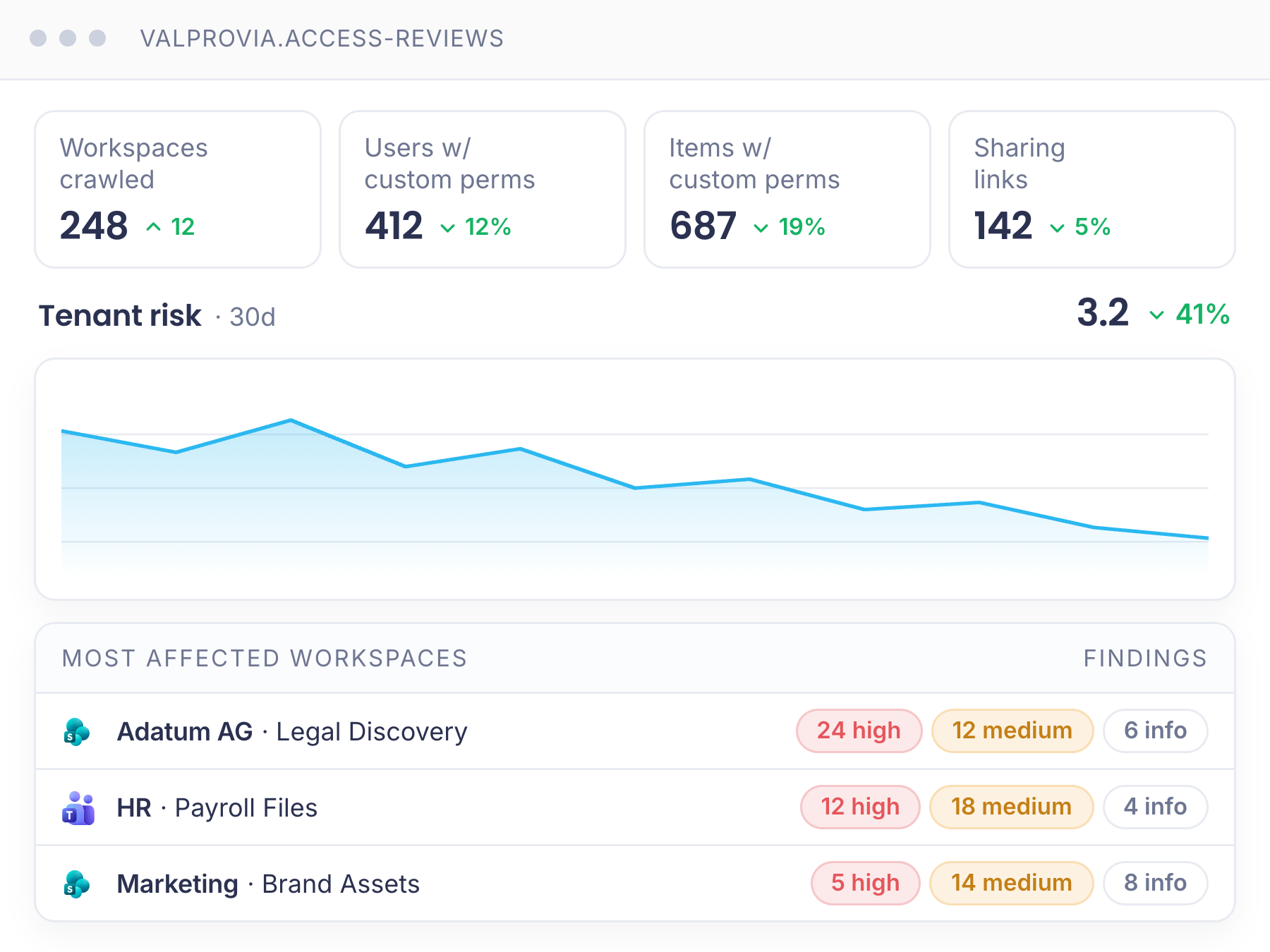
Valprovia Access Reviews - admin overview with KPIs, risk trend and most affected workspaces

Trusted by

Geberit
Dr. Oetker
Stadtsparkasse München
Lenzing
Horváth

Why now

Years of unreviewed sharing - and an AI that reads everything

The tenant is already overshared. Years of legacy SharePoint and Teams sharing - most of it never reviewed by the people who own the workspace. With Copilot in the loop, an overshared document no longer sits quietly: it gets retrieved, summarised, and surfaced to whoever asks.

And the auditors are catching up. ISO 27001, TISAX, SOC 2, NIS2, GDPR Art 30 - every framework asks the same question: who has access, when was it last reviewed, by whom, and why. Screenshots and PowerShell exports stopped being a credible answer.

How Valprovia Access Reviews works

A 5-minute access review the workspace owner can actually finish.

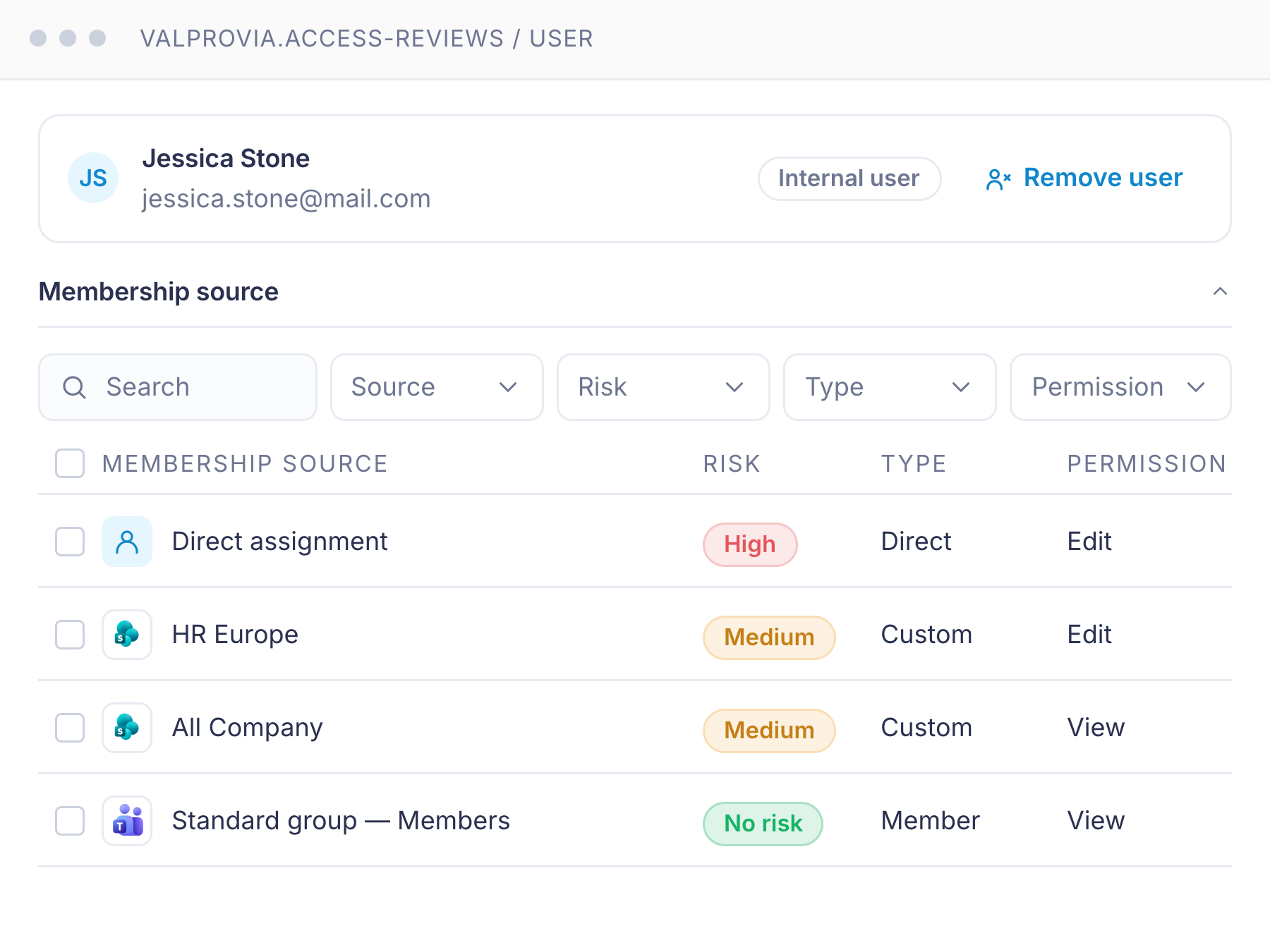
The workspace owner is the only person who knows what should be shared in their workspace. Native Microsoft surfaces never give them a usable place to act, so the cleanup never happens. Valprovia puts every signal an owner needs on one panel - direct, SharePoint group and Entra group access side by side, sharing links and custom permissions in the same view, plain-language risk explanations, one-click restore default access.

For the tenant admin, the same crawl feeds a single risk view across every workspace, member, item, and sharing link - with crawl-session monitoring so you can see exactly what was scanned and when.

Multi-source membership

Direct, SharePoint group and Entra group access - side by side on one panel

No more guessing where "Jessica" gets her permission from. Every membership source is resolved and displayed together - direct grants, SharePoint group membership, and Entra group membership - so the owner can decide in seconds rather than chasing the chain.

Two-path files review

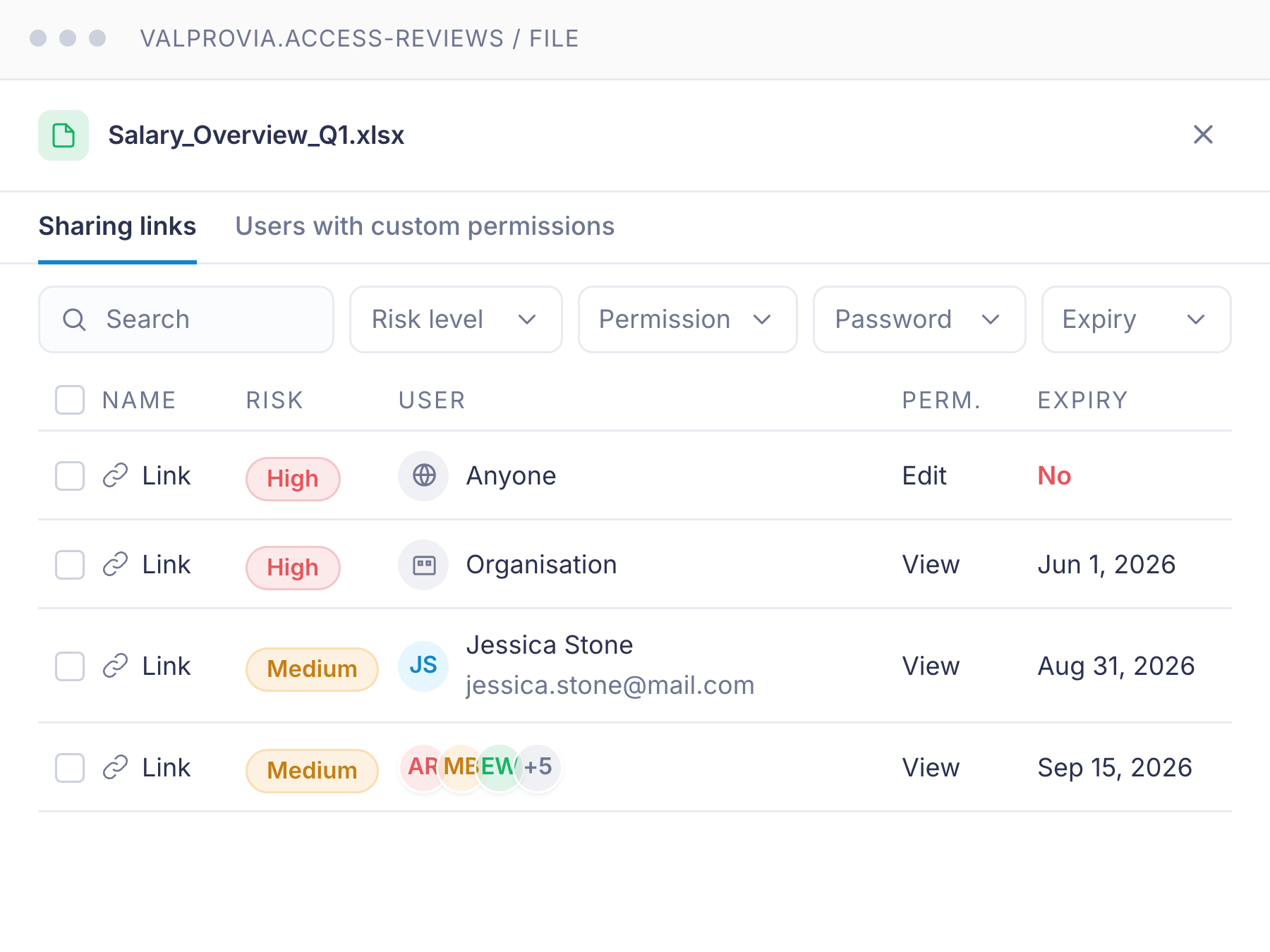
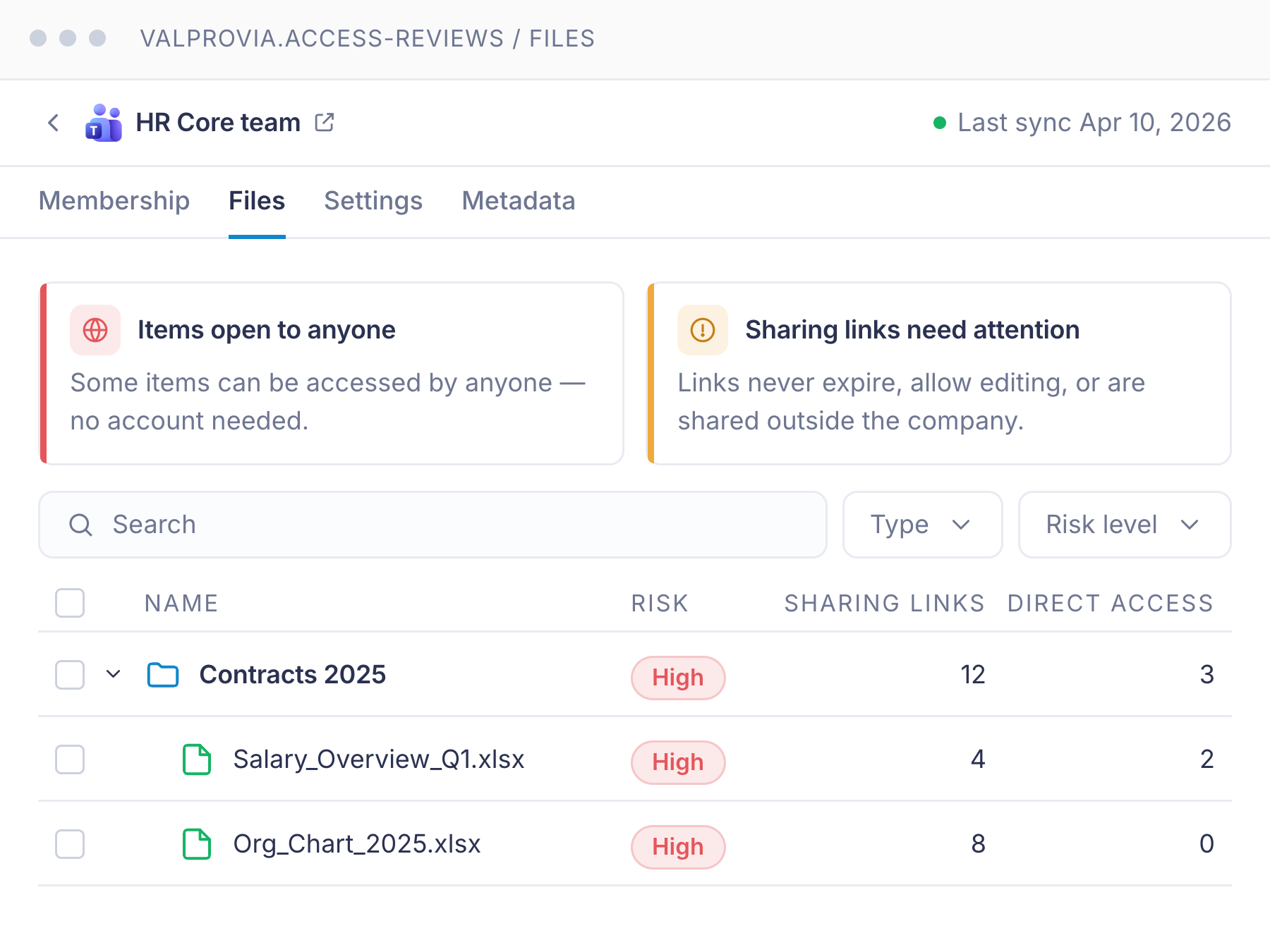
Sharing links and custom permissions in the same panel - both oversharing vectors covered

Oversharing happens through two doors: sharing links (anyone-with-the-link, organisation-wide, external guests) and broken-inheritance custom permissions on individual items. Both paths surface on the same review screen with the same risk taxonomy - no separate tool, no separate workflow.

Risk findings with guidance

Plain-language risk explanations - at the moment the reviewer is about to decide

The reviewer is the workspace owner, not a security analyst. Every finding carries a short, plain-language explanation of why it is flagged - "this site contains documents labelled Confidential and has anonymous links open" - so the owner does not need to know what an Entra group is to make the right call.

Restore default access

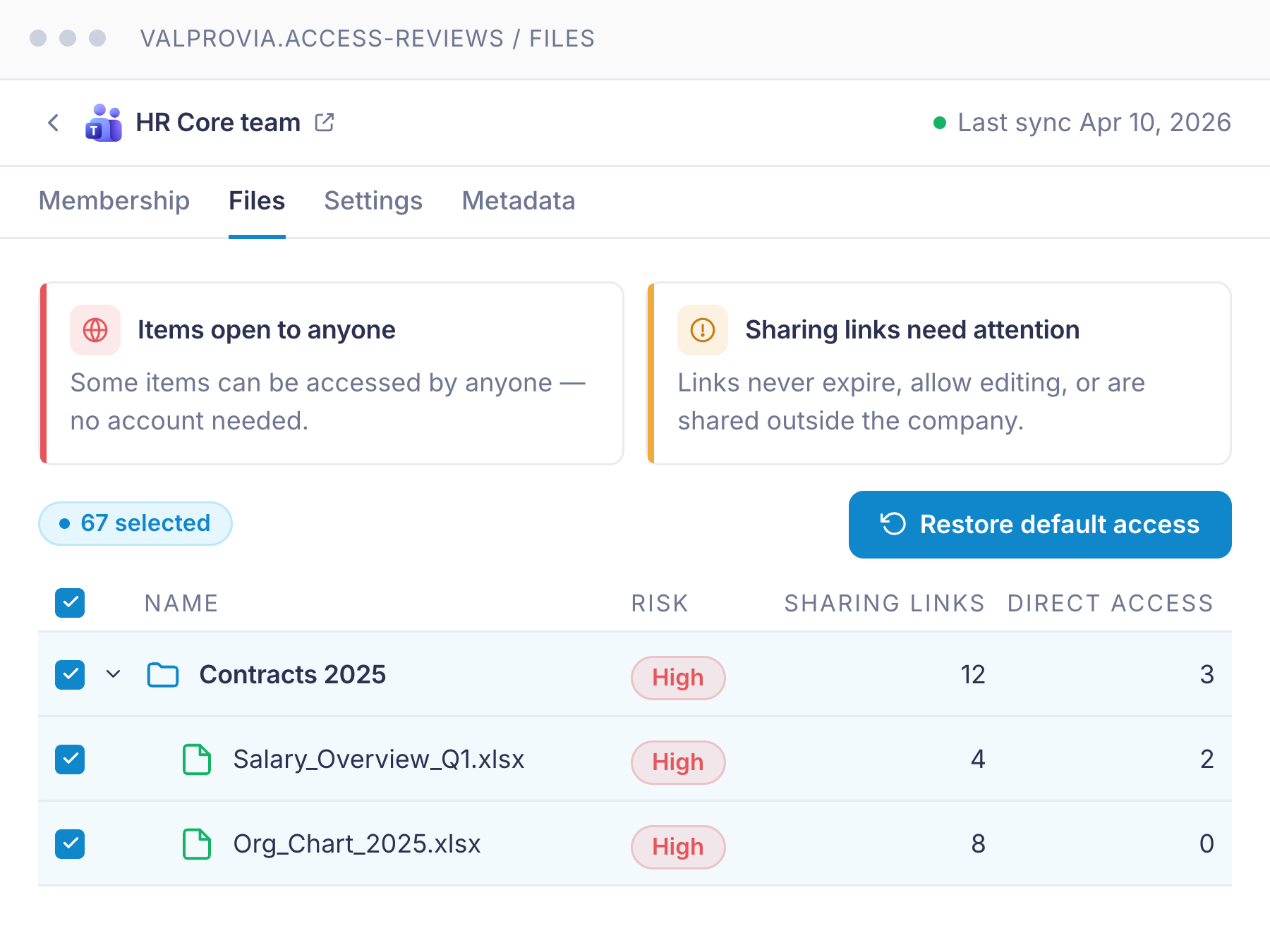
One-click restore - demolishes accumulated drift in a single confirm

When a workspace has accumulated years of one-off grants and broken inheritance, the owner does not need to unwind it one item at a time. One click resets the workspace permissions to the SharePoint default - every change logged, every reasoning captured, fully reversible from the audit trail.

Admin overview

One screen. Risk across the whole tenant. Q3 2026

Triage in three views - Overview (risk drift over time, headline KPIs, most-affected workspaces), Tenant Inventory (flat list across workspaces, members, items, sharing links), and Crawl Sessions (in-app monitoring of every crawl: progress, errors, what was scanned). Tenant inventory and crawl monitoring ship today; the trend dashboard is on the roadmap.

Time to value

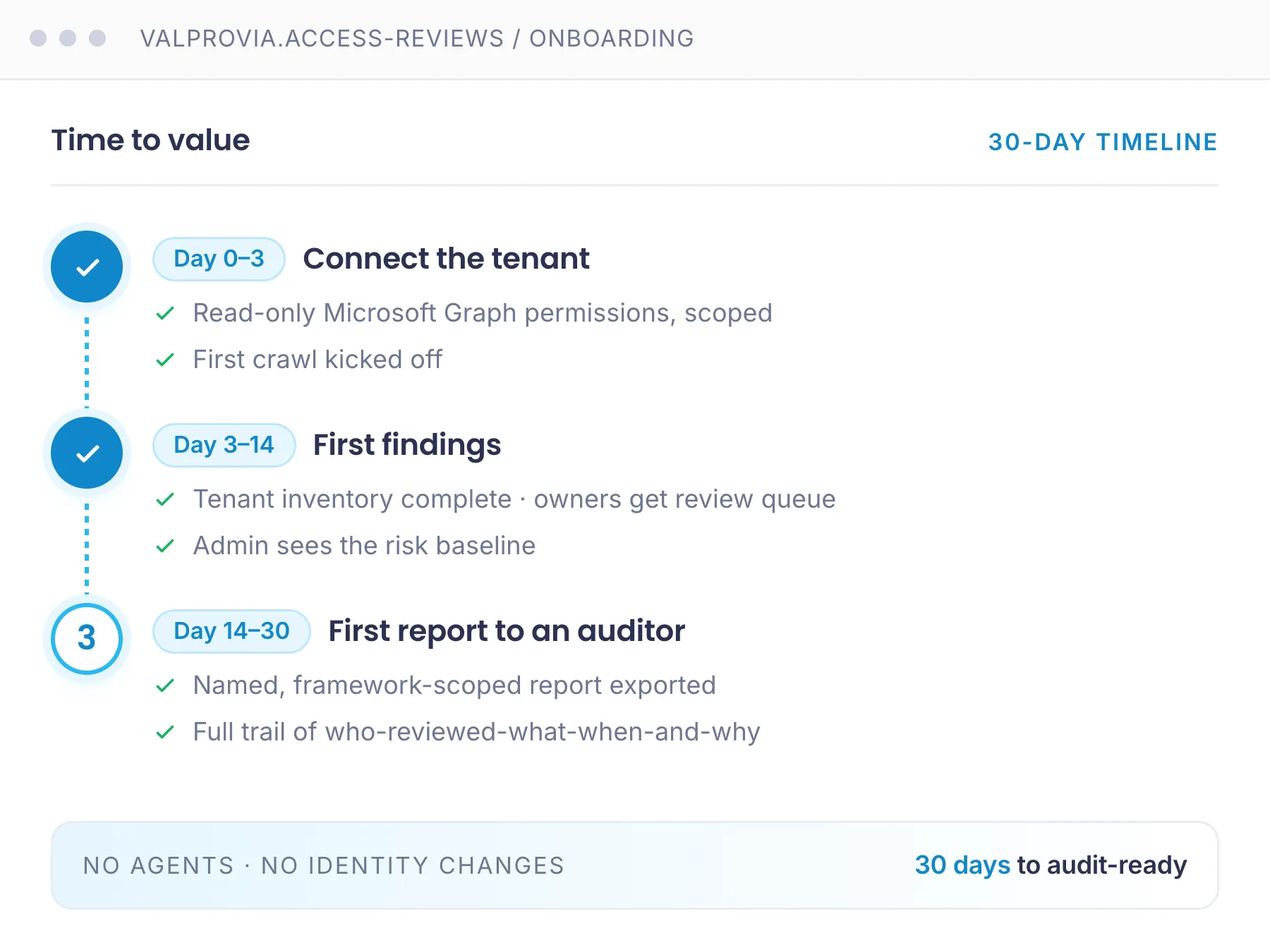
Days to first crawl. 30 days to first auditor-ready report.

Day 0–3 - Connect the tenant. Pick the tenant, name the deployment, grant scoped read-only Microsoft Graph permissions, kick off the first crawl. No agent migration, no identity changes, no on-prem agents.

Day 3–14 - First findings. Tenant inventory complete. Workspace owners get their first review queue. Admin sees the risk baseline.

Day 14–30 - First report to an auditor. Named, framework-scoped report exported with a full trail of who-reviewed-what-when-and-why.

Access Reviews - 30-day onboarding timeline
How we're different

Where we are ahead - and where we do not pretend to be

PowerShell does not scale. Native Microsoft is spread across SharePoint Admin Center, Purview, Entra and SAM. Heavy IGA suites are built for entitlement governance across the enterprise, not the Microsoft 365 workspace owner.

Capability Valprovia Competitors
Self-hosted - inventory never leaves your tenant Yes No (SaaS)
Owner reviews access themselves, no admin rights Yes Partial
Access source per user at a glance (direct + SP + Entra) Yes No
Sharing links + custom permissions in one view Yes No
Risk in plain language, at the moment of review Yes No

Microsoft has the raw data - but Entra, Purview and SAM are built for the security admin, not for the person who owns the workspace. We turn it into a process any owner finishes without technical skills: see, understand, clean up, prove it to the auditor. We are not an enterprise IGA and not a DLP suite - we make the access governance you already pay Microsoft for finally usable.

Compliance and sovereignty

Audit-ready by default. Sovereign by choice.

Audit-ready

Named certification reports

Reports scoped to the framework you are defending - ISO 27001, TISAX, SOC 2, NIS2, GDPR Art 30. Your auditor sees their format, not ours. Review history per workspace, reviewer identity and timestamp, risk taxonomy hits, sign-off notes, exception log and access changes applied. (Named report formats: roadmap.)

Self-hosted

On your network. Your rules.

Run Access Reviews inside your own infrastructure. Your tenant inventory never leaves your environment. Picked by EU public sector, regulated finance, healthcare and DACH organisations with data-residency mandates - anyone who cannot expose tenant inventory to a US-domiciled SaaS.

Made in Germany

GDPR via tenant isolation

German documentation and support. ISO 27001 certification in progress. Read-only Microsoft Graph permissions scoped to what the crawler needs - nothing is written to your tenant unless an owner clicks "apply" on a remediation.

Pricing

Public pricing. Volume tiers. No "Contact Sales" wall.

Three tiers: Standard for inventory, Professional for owner-led access reviews, Enterprise for permission management and Power Platform coverage. Drag the slider to see your reference price.

Live calculation
Your tenant size
users
250 5,000 10,000 15,000 20,000

Standard

2,03 per user/month
at 1,000 users

Inventory and insights for Microsoft 365

  • Collaboration & Storage Inventory across SharePoint, Teams, and OneDrive
  • Usage & Inactivity Insights with trend reports and access patterns
  • Storage Consumption vs. Quota - overview of storage consumption relative to the available quota

Professional

3,64 per user/month
at 1,000 users

Includes all Standard features

  • Owner-led access reviews with campaigns, workflows, and reporting
  • Identity & Document Inventory with Permissions & Sharing Analytics
  • Membership reviews with bulk permission removal

Enterprise

Most Popular
6,07 per user/month
at 1,000 users

Includes all Standard & Professional features

  • Permission Management - Set/Remove Unique Permissions at all levels
  • License Optimization with inactive-user detection and license reviews
  • Power Platform & Agent Inventory (Power Automate, BI, Apps, Copilot)
Customer stories

What organisations running Valprovia say

With Valprovia as a partner, we were able to find an elegant Microsoft 365 governance solution for our clients so that they can now keep their workspaces in Microsoft 365 in sync.

2 FTE saved per 1,000 users
Mario Pufahl
Mario Pufahl
Chief Sales Officer
DIGITALL

The decision for Valprovia was easy for us because we immediately recognized the added value via drastically reducing administrative activities through Valprovia governance module.

95% less effort for workspace provisioning
Rainer Schulz
Rainer Schulz
Head of IT Services
Horváth
Free resource · Governance Guide

Access reviews in the context of the Microsoft 365 Governance Guide

Access reviews are one building block of a broader governance strategy. Our 38-page Governance Guide puts them in context - with the architecture, controls and lifecycle policies for Teams, SharePoint and access reviews. The access-reviews chapter shows how owner-led reviews are set up at scale.

  • Governance maturity self-assessment for IT and security leads
  • Reference architecture for owner-led access reviews at scale
  • Adaptable lifecycle and external-access policy templates
Download the Guide
38 pages PDF · 4.2 MB
VALPROVIA
Microsoft 365 Governance

The ultimate
Governance Guide

August2026
Microsoft Teams
SharePoint
OneDrive
Valprovia

Frequently asked questions about Access Reviews

The questions buyers ask in the first 20 minutes - what we touch in your tenant, where the data lives, how it fits with what you already pay Microsoft for, and how we cover Copilot Agents and Power Platform.

  • What is Valprovia Access Reviews?

    Valprovia Access Reviews is a module that gives owners and IT tenant-wide visibility into who has access to SharePoint, Teams and OneDrive. Owners run periodic access-review campaigns, reset permissions to the SharePoint standard, and produce audit-ready evidence - without PowerShell and without granting end users Site Collection Admin rights. It runs as EU-region SaaS by default, or self-hosted in your tenant.

  • Where does the data live?

    SaaS in EU regions by default. Self-hosted on your infrastructure if your policy requires it - same product, your network. Self-hosted is picked by EU public sector, regulated finance, insurance and healthcare, and DACH organisations with data-residency mandates.

  • How does Access Reviews fit with what we already pay Microsoft for?

    Complement, not replace. Valprovia sits on top of Microsoft Graph and the SharePoint REST API and makes access governance usable for the workspace owner - the person who actually knows what should be shared but cannot operate Entra, Purview or SAM. One tenant view across SharePoint, Teams and OneDrive, plain-language risk explanations at the moment of review, and a process a non-technical owner finishes on their own. Across the Governance module, organizations reach up to 95% lower governance costs, 2 full-time employees saved per 1,000 users, and 240,000 euro in annual productivity gains.

  • How do we onboard workspace owners without a training programme?

    The owner UI is built for non-IT users. Plain-language risk copy means the reviewer does not need to know what an Entra group is. Most owners finish their first review in under five minutes. Owner self-service review depth is what closes the deal in most deployments - we built the persona Microsoft skips.

  • Do you cover Copilot Agents and Power Platform?

    Yes - both are part of the Enterprise tier. Power Platform inventory covers Power Automate, Power BI and Power Apps. Agent inventory covers SharePoint Agents, Copilot Agents and Copilot Studio Agents. Both are on the roadmap and available to Enterprise customers as they ship.

  • How quickly do we see a result?

    Days to first crawl, 30 days to first auditor-ready report. Day 0–3 connect the tenant and kick off the first crawl. Day 3–14 owners get their first review queue and admins see the risk baseline. Day 14–30 first named-framework report exported with a full review trail.

  • How does Access Reviews relate to the Governance module?

    Two halves of the same story. Governance prevents sprawl before it happens - templates, naming policies, custom roles, enforced permissions, automatic lifecycle. Access Reviews inventories and reviews the rest, everything that has already drifted in the workspaces you already have. Both come from one vendor, run in one tenant, and sit on one cost line. Others sell preventive and reactive as two separate products with two contracts. Most customers buy both; you can buy Access Reviews on its own if your existing workspaces are the priority.

Configure. Review.
Prove it.

Connect a tenant in days. Bring auditor-ready evidence to your next review. 30-minute walk-through on your tenant, scoped pilot on one business unit, or an architecture and security review for your security team - pick how you want to start.