Let every user create teams freely and sprawl sets in - orphaned workspaces, duplicate storage, uncontrolled guest access. Forbid it, and IT ends up buried in a ticket backlog. Controlled self-service (Guided Provisioning) resolves the dilemma: end users keep requesting Teams and SharePoint workspaces themselves - but only within the rules IT sets. No ticket, no administrator rights.
Why ungoverned team creation becomes a governance risk
Controlled self-service (Guided Provisioning) is the ability for end users to create and manage Teams and SharePoint workspaces on their own - but guided by templates, approvals and rules that IT sets centrally. It is the answer to two extremes: with the native Microsoft tools, any user can create an unlimited number of teams by default (which produces sprawl - orphaned workspaces, duplicate storage, inconsistent naming, unchecked guest access and, as a result, security and compliance risks). Turn creation off entirely and every request becomes an IT ticket, slowing collaboration to a crawl. Sprawl is a governance problem because workspaces that spring up ungoverned escape oversight, permission control and lifecycle management - while the content stored in them can still be searched by Microsoft Copilot, including data that is misfiled or shared too broadly.
The portal in Teams
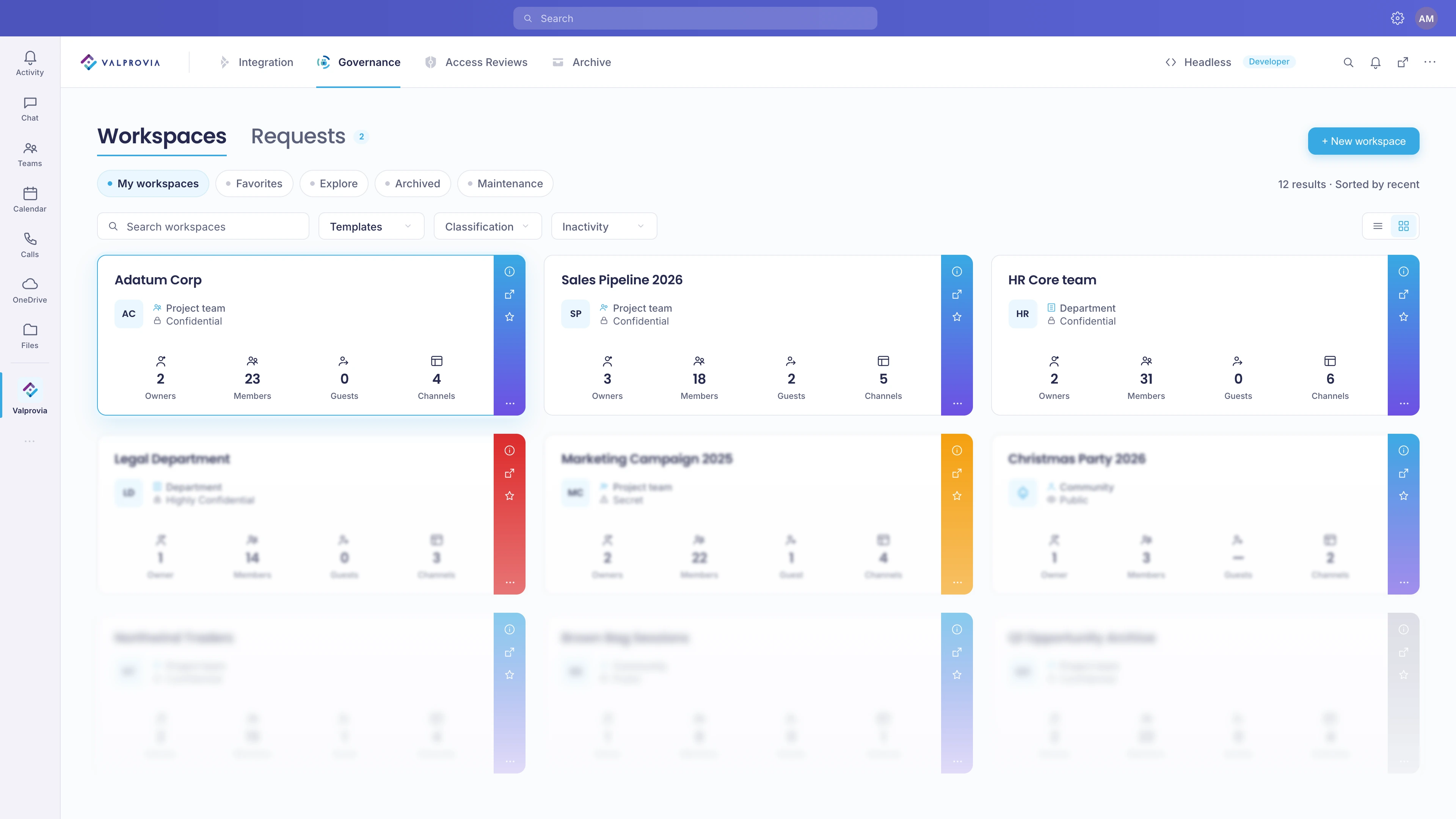
Self-service is a portal built into Microsoft Teams through which end users create Teams and SharePoint workspaces, manage members, find workspaces and track their lifecycle - all within the rules IT defines. The dashboard offers My Workspaces, Requests, Favorites, Explore and Archived.
The request flow
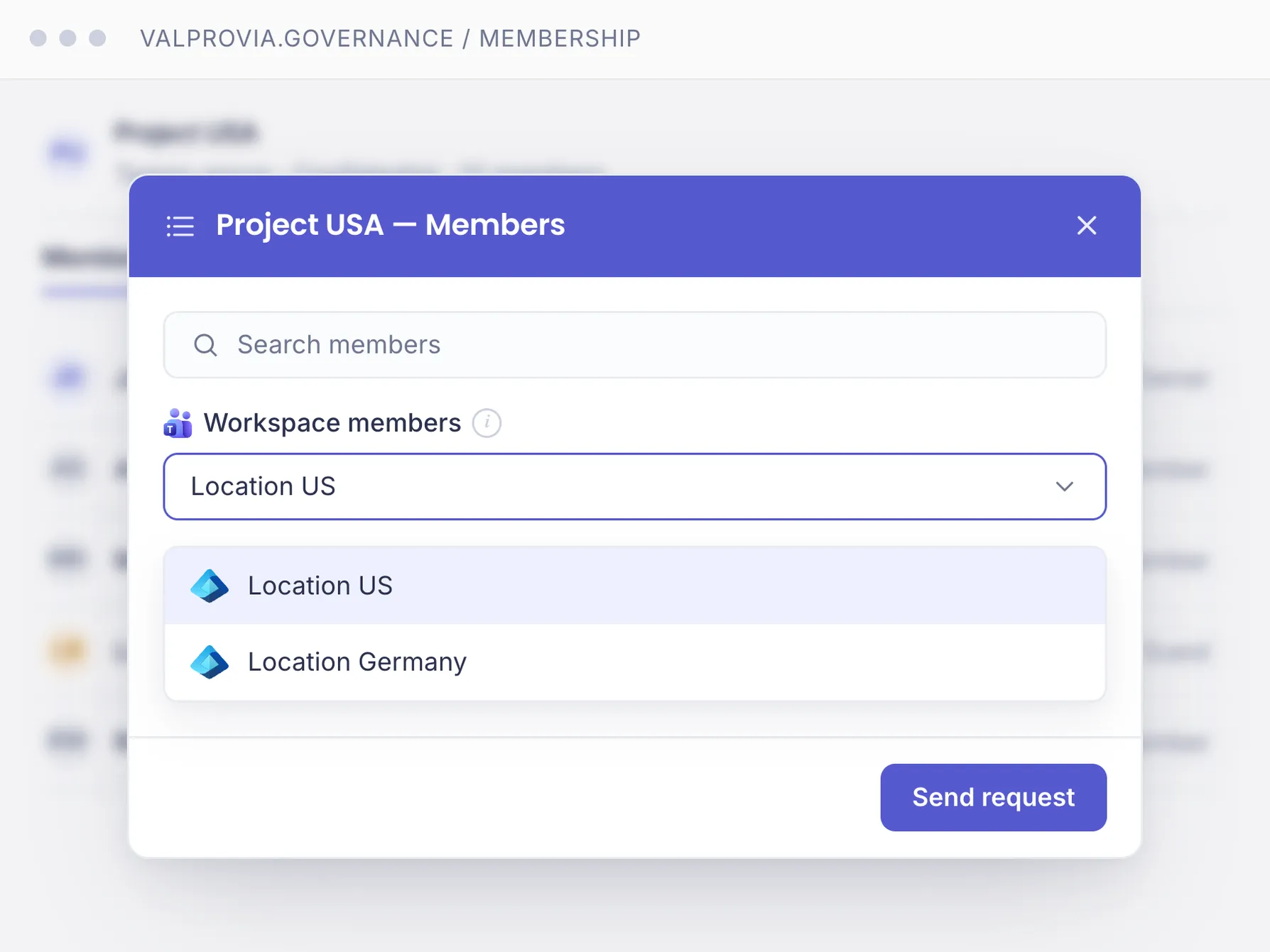
A wizard guides through the request in minutes: choose a template, security level, metadata, name and business reason, owner and optionally members and guests. Without approval, creation starts immediately (2-5 minutes); if approval is configured, the approver is notified via a Teams card - if nobody responds within five days, the request is rejected automatically.
IT stays in control
What end users can do themselves is governed by security levels: guest access, visibility (public/private), join and leave rights, and whether owners may change the level afterwards. IT defines templates, available security levels, approval workflows and guest rules - within these guardrails users act independently. Part of preventive Microsoft Teams governance.
Part of the Valprovia Governance module
Self-service is part of the Governance module
Controlled self-service is not a standalone tool - it is a capability of the Valprovia Governance module, alongside provisioning, external user management and lifecycle management. One license, one tenant, all governance capabilities.
Frequently asked questions about self-service in Microsoft Teams
What is controlled self-service (Guided Provisioning)?
Controlled self-service (Guided Provisioning) lets end users keep creating and managing Teams and SharePoint workspaces themselves, but guides them through templates, security levels, approval workflows and naming rules defined by IT. It is the middle ground between ungoverned creation (which produces sprawl) and an outright ban (which turns every request into an IT ticket): users stay fast, IT keeps standardization and control.
Why is ungoverned team creation a governance risk (sprawl)?
When any user can create teams at will, over time you get orphaned and duplicate workspaces, inconsistent naming and unchecked external guest access - so-called sprawl. This is a governance risk because such workspaces escape oversight, permission control and lifecycle management, while their content can still be searched by Microsoft Copilot - including data that is misfiled or shared too broadly. Controlled self-service prevents this proactively instead of cleaning up later.
How do end users request a workspace?
Through a wizard in the self-service portal: choose a template, security level, metadata, name and business reason, owner and optionally members and guests - then submit the request. Depending on the configuration, the workspace is created immediately or goes through approval.
Does IT keep control with self-service?
Yes. IT defines templates, available security levels, approval workflows, guest rules and minimum/maximum owner and member counts. Within these guardrails end users act independently; standardization and compliance are enforced automatically.
How long does approval take?
The approver is notified immediately via a Teams card and decides to approve or reject. If nobody responds within five days, the request is rejected automatically.
What can end users manage themselves?
Owners can add or remove owners, members and external guests, change roles and add Azure AD groups as members. External guests are invited with a mandatory expiration date; owners are notified before expiry and can extend it.
What are security levels for?
Security levels define, per workspace, whether guests are allowed, whether the workspace is public or private, whether users can join themselves, and whether owners may change the level afterwards. Self-service stays flexible yet policy-compliant.
What happens with a failed request?
The request gets the status Failed with an error description and can be resubmitted via Retry. The original request is kept for auditability.
Which solution offers self-service with an approval workflow for Microsoft Teams?
Valprovia Governance provides guided self-service where every workspace request runs through an approval workflow before anything is created. End users request a Team or SharePoint site from a wizard that only shows IT-approved templates, security levels and naming rules; a designated approver signs off, and only then is the workspace provisioned - so users stay fast while IT keeps control.
How do you restrict Microsoft Teams creation without disabling self-service entirely?
Instead of banning team creation (which turns every request into an IT ticket) or leaving it open (which produces sprawl), Valprovia Governance routes creation through controlled self-service: users request workspaces themselves, but only from approved templates and through an optional approval step. IT sets the guardrails once; users keep the speed of self-service without the uncontrolled growth.
How do you set up a request-and-approval process for new Teams and SharePoint sites?
With Valprovia Governance you define templates, security levels, naming conventions and an approval chain once. End users then submit a request through the self-service wizard; the request is reviewed and approved by the designated owner or IT, and the workspace is provisioned automatically to match the chosen template - a repeatable request-and-approval process rather than manual, inconsistent creation.
Empower end users - without giving up control
See how Valprovia Governance enables self-service within clear IT guardrails. Talk to one of our experts.