


SharePoint Advanced Management (SAM) and Valprovia do not compete - they complement each other. In one sentence: SAM shows you oversharing. Valprovia makes sure it never arises in the first place - and cleans up the rest enforceably. SAM is a reactive tool: it reports existing oversharing and makes a Microsoft 365 tenant Copilot-ready. Valprovia works at two other points in the permission lifecycle: Valprovia Governance prevents oversharing at provisioning, and Valprovia Access Reviews makes cleaning up the risks you find enforceable. Together, the three cover the entire lifecycle.
The question "Do I need Valprovia if I have SAM?" poses a false choice. SAM, Governance, and Access Reviews solve different problems at different points in time - they do not replace one another, each covers its own phase.
The permission lifecycle has three phases
Every permission in Microsoft 365 goes through the same three phases: it is created, it becomes visible as a risk (eventually), and it has to be cleaned up. Depending on the phase, a different tool is the right one:
| Phase | Task | Tool | Point in the lifecycle |
|---|---|---|---|
| Prevent | Oversharing and sprawl never arise in the first place | Valprovia Governance | before the action (provisioning, enforcement) |
| Detect | Make existing oversharing visible, Copilot readiness | SharePoint Advanced Management | after the action (reporting) |
| Remediate | Clean up found risks in a structured, enforceable, auditable way | Valprovia Access Reviews | after detection (cleanup) |
SAM deliberately sits in the middle. It is strong in the detect phase - but it is built neither to prevent oversharing nor to enforce the cleanup. Those two ends are exactly what Valprovia occupies.
What SAM delivers - and where it deliberately stops
SAM bundles security, lifecycle, and governance reports in the SharePoint admin center and is included at no additional cost as soon as at least one Microsoft 365 Copilot license is assigned in the tenant. Its strength is detect: the Data Access Governance reports reliably show which sites are overshared, and Restricted Content Discovery temporarily removes sensitive sites from search and Copilot while permissions are reviewed. For a Copilot rollout, that is a sensible first step. Details in the deep dive on SharePoint Advanced Management.
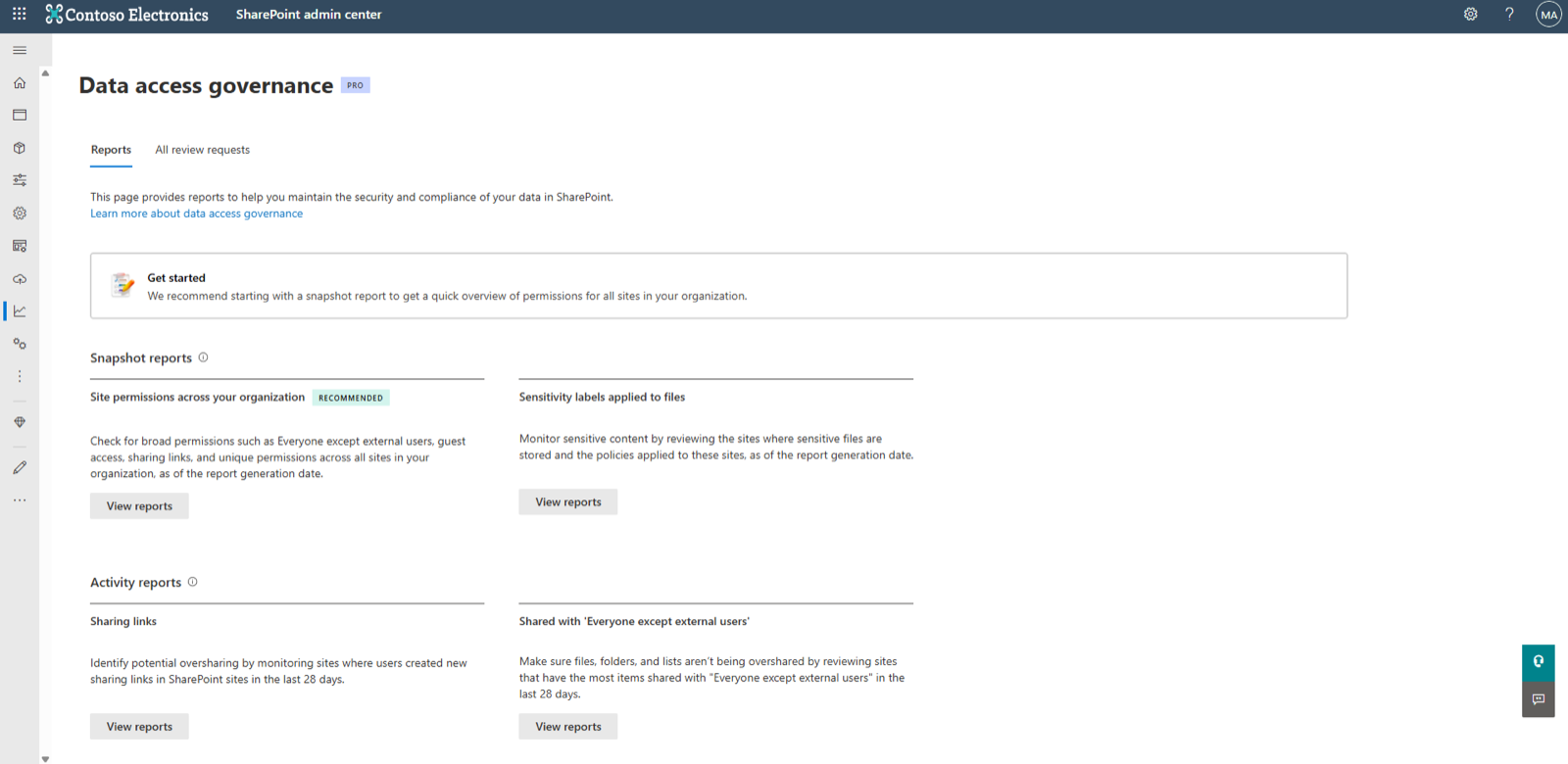
Where SAM deliberately stops: it has no provisioning gate that strips admin rights from end users - so oversharing keeps arising. And while the site access reviews delegate to owners, they do not verify whether a review was fully addressed, offer no export, and do not remove permissions automatically. SAM shows the problem; preventing it and enforceably cleaning it up remain open.
Prevent: where Valprovia Governance sits ahead of SAM
The reason a tenant accumulates thousands of unique permissions at all lies in the default behavior of Microsoft 365: every end user can create teams, share sites, invite guests, and change permissions. Microsoft 365 Governance reverses that - preventively, before the action happens:
- Admin rights removed at provisioning. End users lose the Site Collection Administrator and Teams Owner roles. No one can bypass governance through privileged owner rights anymore - not even the team creator.
- Template-based provisioning. Teams and SharePoint sites are created exclusively from IT-defined templates: naming, channels, permission schemes, and sharing settings are preconfigured. Every creation runs as a request through an approval workflow.
- Guests with expiration date, NDA requirement, and domain allowlist. External access expires and is removed automatically - no "forgotten" guests that a later report would first have to surface again.
The effect: the 1,333 unique permissions a SAM report finds on a typical problem site never arise under preventive governance. There is simply less to detect - and less to clean up.
Remediate: where Valprovia Access Reviews fills SAM's gaps
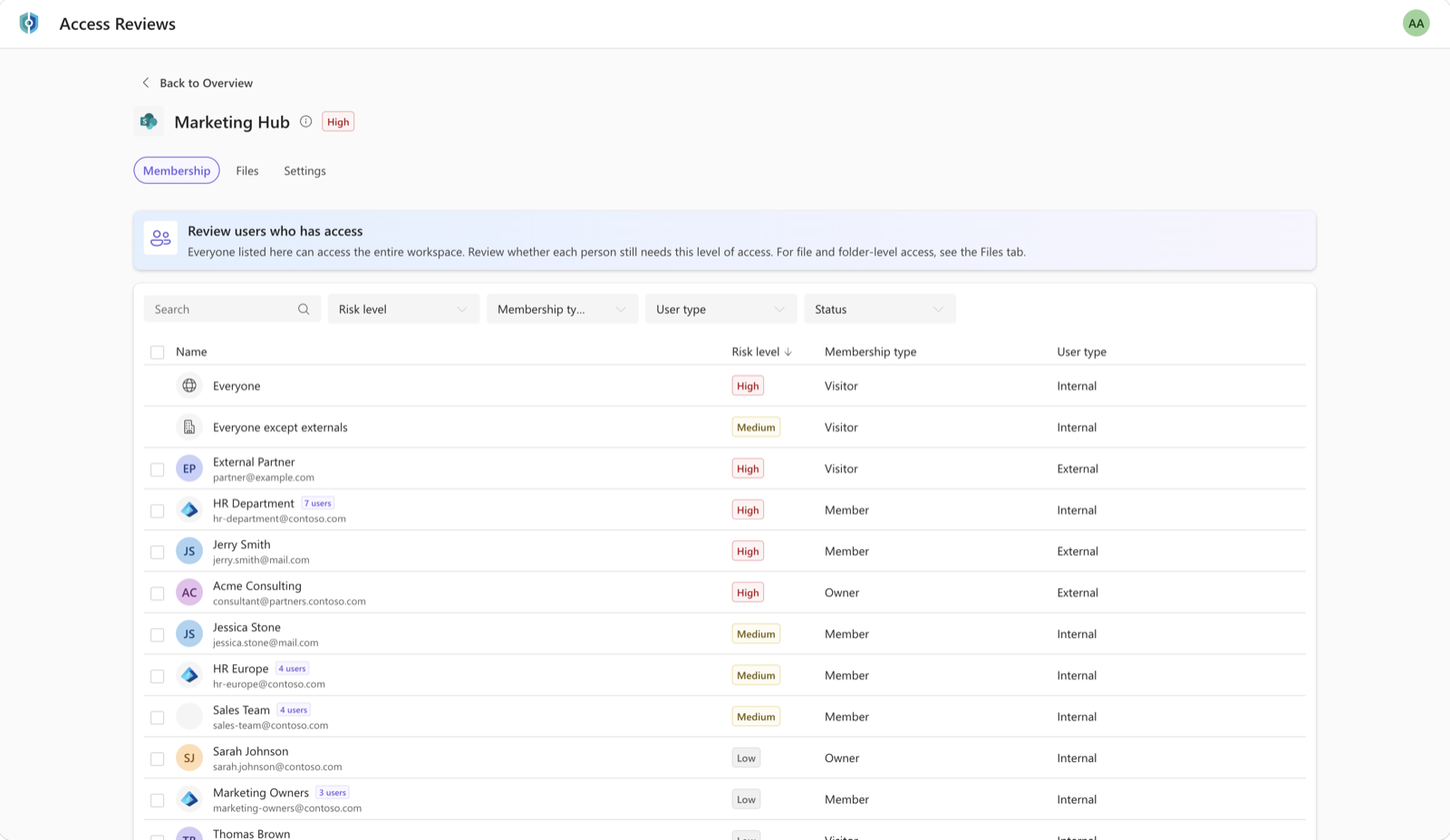
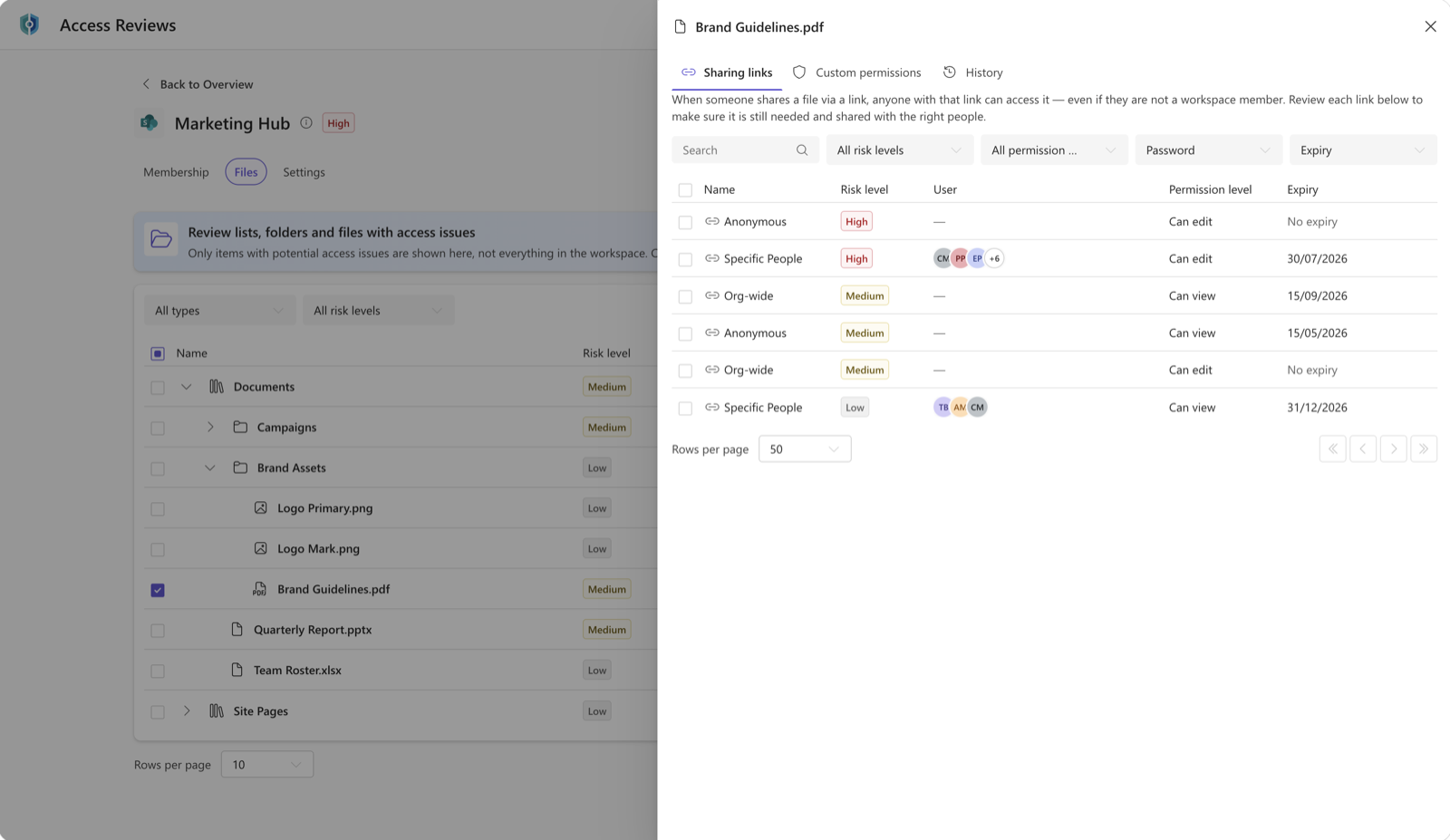
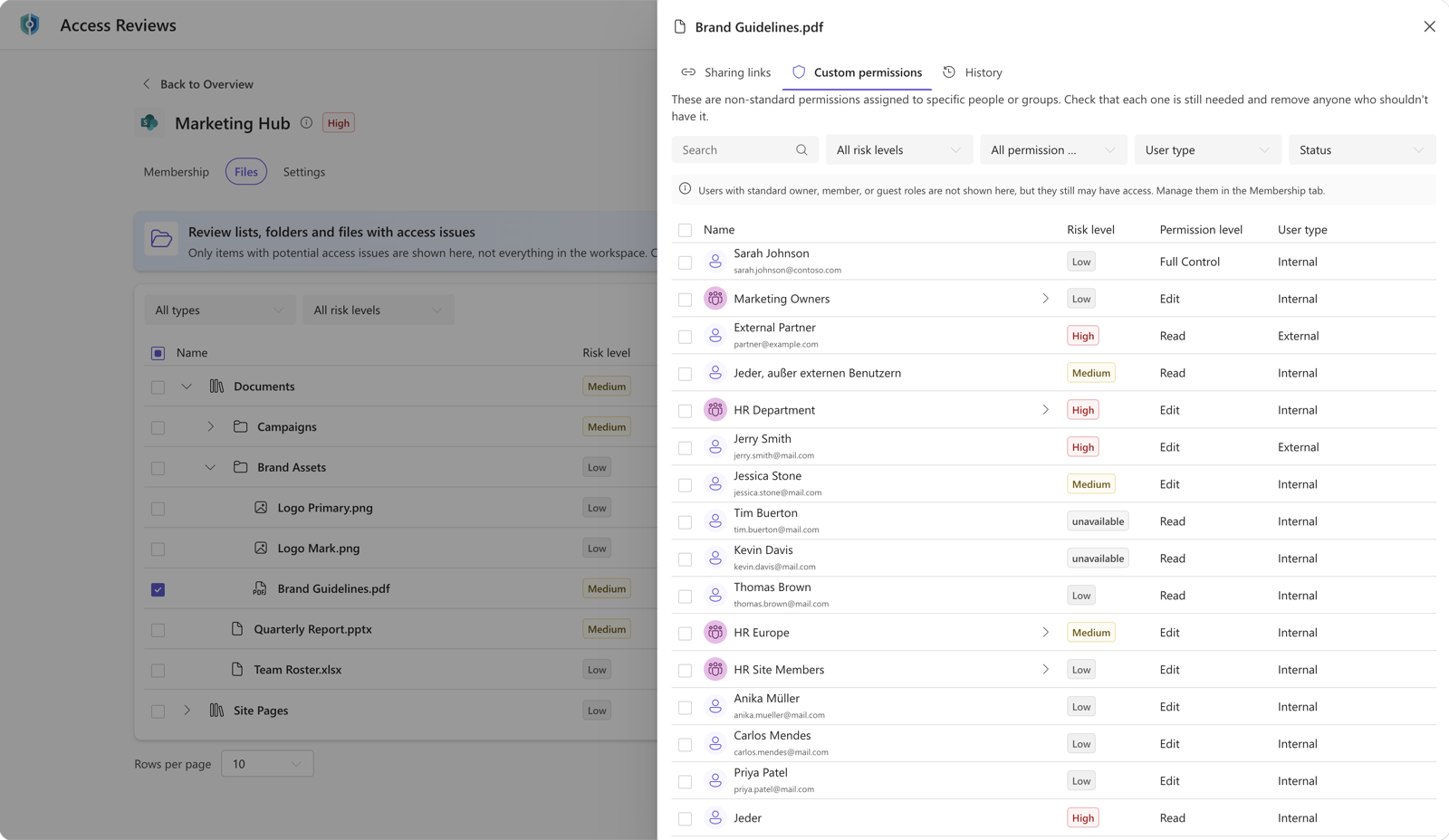
What SAM finds, someone has to clean up. Valprovia Access Reviews picks up exactly at the limits of the native site access reviews - every SAM gap gets an answer:
| SAM limitation | Valprovia Access Reviews answer |
|---|---|
| Reports show affected sites, but for compliance reasons the IT admin cannot see file- and item-level details - those are reserved for the site owner | Multi-source membership (direct, SharePoint-group, and Entra-group access) plus a files review for sharing links and custom permissions - on one surface, visible to the admin too |
| No export, no batch actions - only the SharePoint list's per-column sort/filter within the current page | Named certification reports with a complete export for auditors, filters and batch actions across the full set |
| No enforcement: reviews stay "pending" indefinitely when the owner does not react - nothing happens | Automatic permission removal on deadline expiry and one-click restore to the target state |
| Hard volume limits: max. 100 sites per review initiation from the report view, 1,000 reviews per calendar month from the site permissions report, activity reports cover only the last 28 days | Review campaigns across the full workspace estate, with no monthly quota |
| Site access reviews support SharePoint sites only - OneDrive accounts are excluded | Reviews across SharePoint, Teams, and OneDrive |
| Finds oversharing only after it has arisen | Complemented by Valprovia Governance, which prevents it from arising (prevent phase) |
Every SAM limit named here comes from the Microsoft Learn documentation on Data Access Governance and site access reviews (as of July 2026) - these are documented product decisions, not a judgement. Important: Valprovia Access Reviews does not replace SAM. SAM can stay in use as the detect tool - Access Reviews takes on the enforceable remediation that SAM leaves open. Both run in parallel.
Do you need SAM and Valprovia at the same time?
Yes - and that is not a contradiction, it is the actual answer. You keep SAM anyway once a Copilot license is in the tenant; as a detect tool and for Copilot readiness it serves its purpose. Valprovia layers onto the two ends: Governance so that less oversharing arises, and Access Reviews so that what does arise is cleaned up enforceably. The difference is functional and temporal - not "better or worse," but "different phase."
Anyone using only SAM sees their oversharing problems in the report but has to work through them manually and without enforcement - and keeps producing new oversharing in daily operations. Anyone adding Governance and Access Reviews closes the loop: prevent, detect, remediate enforceably.
Frequently asked questions about SAM and Valprovia
Do SharePoint Advanced Management and Valprovia compete?
No. They solve different phases of the permission lifecycle. SharePoint Advanced Management is a reactive detect tool: it reports existing oversharing and supports the Copilot rollout. Valprovia Governance prevents oversharing at provisioning (prevent), and Valprovia Access Reviews makes cleaning up found risks enforceable (remediate). They complement rather than compete.
Does Valprovia replace SharePoint Advanced Management?
No. SAM can stay in use as a detect tool and for Copilot readiness - it is included in the Copilot license anyway. Valprovia does not replace it but complements the two phases SAM leaves open: prevention via Valprovia Governance and enforceable cleanup via Valprovia Access Reviews. Both run in parallel to SAM.
Do I still need Valprovia if I already use SAM?
It depends on your tenant size. SAM reliably shows you where oversharing exists. But as soon as you want to clean up what you find in a structured, exportable, enforceable way - or prevent new oversharing from constantly arising - the SAM built-in tools hit their limits. Those two ends are exactly what Valprovia Access Reviews and Valprovia Governance cover.
What does Valprovia Governance do that SAM cannot?
Valprovia Governance prevents oversharing before it arises: end users lose their admin rights (Site Collection Administrator, Teams Owner) at provisioning, workspaces are created only from IT templates via approval workflows, and guests expire automatically with an end date. SAM has no such provisioning gate - it reports oversharing after it has arisen.
What does Valprovia Access Reviews do that SAM cannot?
Valprovia Access Reviews delivers reporting at file and permission level including who is permissioned, exports all results for auditors, and removes permissions automatically when a review is not addressed on time. The native site access reviews in SAM, by contrast, do not verify whether a review was complete, offer no export, and enforce nothing automatically.
Can SAM and Valprovia run in parallel?
Yes. Valprovia Access Reviews and Valprovia Governance are designed to run alongside the Microsoft built-in tools. SAM stays in use as the detect layer and for Copilot readiness; Valprovia complements the prevent and remediate phases. There is no need to retire SAM.
Conclusion
The question is not "SAM or Valprovia," but "which phase of the permission lifecycle does which tool cover." SAM is strong in detect and for Copilot readiness. Valprovia Governance prevents oversharing one layer earlier, Valprovia Access Reviews cleans up what is found enforceably and auditably. Together the three close the loop - prevention, detection, and remediation each cover their own phase rather than compete.
Book a demo: See how Valprovia Governance and Access Reviews close the gaps SAM leaves open.


